标签 地址 下的文章

说明:服务器上无法管理数据库,不知道哪里出问题了,所以下载了Navicat,这个版本是12.0.24
TIM截图20190516155500.png

下载地址

https://pan.baidu.com/s/1ZxO06G7Xy6SqGzHLZnp76g 密码:bjy3

步骤

1.管理员运行cmd,切换到目录下
2.执行命令
Patch.exe "安装目录\navicat.exe"
3.
Keygen.exe RegPrivateKey.pem
执行后会生成key,断网,打开软件把key粘贴进去,点击注册,点击手动注册
手动注册后后出现一个请求码的界面,把请求码复制粘贴到命令提示符中按两下回车会生成激活码
激活码粘贴到软件中,激活成功

说明:买的阿里云国内学生机,一年114.开通后第一件事当然是重装。装完后发现国外源"snapshot.debian.org"特别慢,遂换成国内的。
VPS一键重装Debian系统

更换步骤

vi /etc/apt/sources.list
加#注释掉原来的,并添加阿里云源地址

deb http://mirrors.aliyun.com/debian stretch main contrib non-free
deb-src http://mirrors.aliyun.com/debian stretch main contrib non-free
deb http://mirrors.aliyun.com/debian stretch-updates main contrib non-free
deb-src http://mirrors.aliyun.com/debian stretch-updates main contrib non-free
deb http://mirrors.aliyun.com/debian-security stretch/updates main contrib non-free
deb-src http://mirrors.aliyun.com/debian-security stretch/updates main contrib non-free

stretch可以替换成jessie或者wheezy
保存后执行
apt-get update

参考:
http://ningxy.cn/Debian%209%20%E6%8D%A2%E9%98%BF%E9%87%8C%E5%8C%85%E6%BA%90.html

说明:电信版r3g

升级为开发版

在小米路由器官网下载开发版固件,在系统升级中升级。

绑定路由器

手机上下载小米路由器app,路由器在没进行任何配置的情况下用app配置并绑定(设置过的恢复出厂在用app配置)。

开启ssh

方法和root密码:http://d.miwifi.com/rom/ssh

刷入不死breed

用WinSCP上传breed-mt7621-xiaomi-r3g.bin到/tmp下
下载地址:https://breed.hackpascal.net/
xshell执行命令
mtd -r write /tmp/breed.bin Bootloader

刷入固件

下载地址(搜索r3g):https://opt.cn2qq.com/padavan/
用牙签等尖锐物按下路由器 reset 按钮后重新接入电源。电脑上输入 192.168.1.1进入不死 Breed 的控制台。
依次选择:固件更新 -> 常规固件 -> 勾选固件复选框 -> 浏览,选择上一步下载好的 Padavan 固件上传,刷入搞定

注意:刷入固件后重启死机不进入路由器系统的需要删除 normal_firmware_md5 参数再上传一次固件。
image

说明:路由器新路由3作为客户端frpc,Google cloud香港有公网IP安装服务端frps

vps上安装服务端

1.下载服务端

#切换到root目录下
cd /root
#下载0.21版本
wget --no-check-certificate https://github.com/fatedier/frp/releases/download/v0.21.0/frp_0.21.0_linux_amd64.tar.gz
#解压
tar -xzvf frp_0.21.0_linux_amd64.tar.gz
#文件夹重命名
mv frp_0.21.0_linux_amd64 frp
#进入frp目录
cd frp
#赋予权限
chmod +x frps
#执行帮助命令测试frp是否能运行
./frps --help

2.写入配置文件

echo "[common]
bind_port = 7000
token = 12345678
dashboard_port = 7500
dashboard_user = admin
dashboard_pwd = admin
vhost_http_port = 10080
vhost_https_port = 10443
subdomain_host = sixu.life" > frps.ini

3.测试运行frps
./frps -c frps.ini
ctrl+c退出
4.开机启动

#编辑 开机启动文件
vi /etc/rc.local
#按 i 进入编辑模式并添加下面的命令到 exit 0 语句之前
nohup /root/frp/frps -c /root/frp/frps.ini &
#按 esc 退出编辑模式再按 :wq 保存并退出

路由器上配置

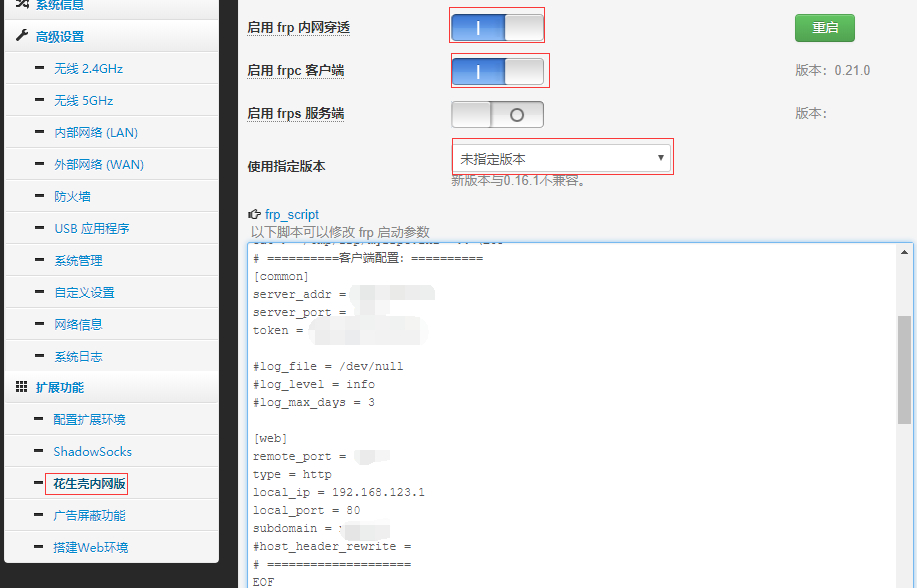
1.依次点击:花生壳内网版--frp
启用 frp 内网穿透 选中
启用 frpc 客户端 选中
2.修改配置文件

# ==========客户端配置:==========
[common]
server_addr = 对应服务器IP地址
server_port = 对应服务端的 bind_port
token = 对应服务端 token

#log_file = /dev/null
#log_level = info
#log_max_days = 3

[web]
remote_port = 对应服务端vhost_http_port
type = http
local_ip = 192.168.123.1
local_port = 80
subdomain = 自定义子域名,例如test.sixu.life,则此处自需要输入test
#host_header_rewrite = 
# ====================
EOF

3.点击应用本页设置
4.运行成功会看到类似的提示

login to server success, get run id [], server udp port [0]
start proxy success

image

域名解析

为了方便,可直接添加泛解析 * a记录指向服务器IP

其他

例如上文的设置来说:
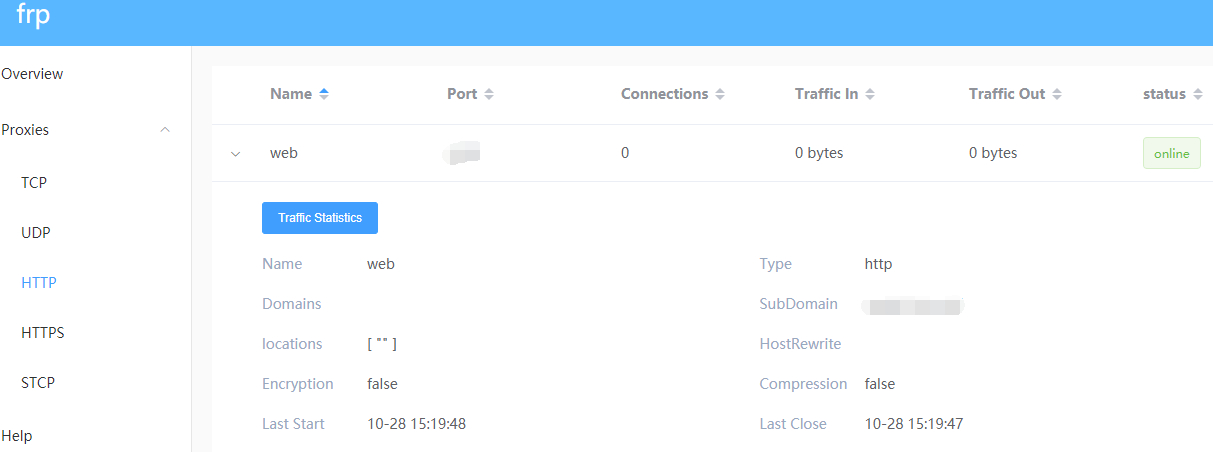
1.登录服务端的 dashboard 的地址为:服务器ip:7500
2.外网访问地址为:test.sixu.life:10080
image

说明:ss-panel-v3使用的SMTP发邮件,之前阿里云国际版用465端口正常,迁移到DigitalOcean不能使用25和465给客服发ticket,得到的回复如下:

[scode type="share"]Thank you for reaching out to us. We're very sorry that you are facing issues with SMTP.

Stopping spam is a constant fight and due to this, your account has restrictions specifically on ports 25 and 465. However, you are be able to send out mail using port 587. You will need to open the port in your firewall.

We realize this is inconvenient, but many customers in your position move their mailing activities to a third party service such as SendGrid or similar which processes such mail separately from their droplet. I'm sorry for the frustration but we're not able to lift these port restrictions at this time.

In terms of a workaround, here are a few alternatives:

  1. Utilize port 587 for SMTP relay via another mail provider, for example G Suite/Gmail, Mailgun, etc. We have a guide on doing so using Postfix here:

https://www.digitalocean.com/community/tutorials/how-to-set-up-a-mail-relay-with-postfix-and-mailgun-on-ubuntu-16-04

  1. Configure your app or service to send mail directly using either a SMTP client connection (typically using port 587), or API call via another mail provider such as Sendgrid, Mailgun, Mandrill, etc.

Please note that with this restriction in place on port 25, mail servers hosted here will be unable to directly relay email to other mail servers, as communication between mail servers typically takes place on port 25.

We think the API is the best solution, as it is honestly more scalable and what we would use if we wanted to "future proof" the project.

Please feel free to reach out to us via this ticket if you have further queries or concerns, we will be around to help you out!

Regards,

Saurabh
Developer Support Specialist - DigitalOcean

(Check out our fantastic community articles: https://www.digitalocean.com/community)[/scode]
所以决定使用Gmail的587来发送邮件。

开启IMAP

1.在计算机上打开 Gmail。
2.点击右上方的“设置”图标。
3.点击转发和 POP/IMAP 标签。
4.在“IMAP 访问”部分,点击启用 IMAP。
5.点击保存更改。

开启安全性较低的应用的访问权限

直达链接:https://myaccount.google.com/lesssecureapps

SMTP设置

发送邮件 (SMTP) 服务器:smtp.gmail.com
要求 SSL:是
要求 TLS:是(如适用)
使用身份验证:是
TLS/STARTTLS 端口:587
完整名称或显示名称:您的姓名
帐号名、用户名或电子邮件地址:您的完整电子邮件地址
密码:您的 Gmail 密码

说明:首汽约车时一个网约车平台,收入单价比滴滴出行高。
带车加盟首汽约车
完成7单可奖220元

注册地址

1.https://img.yun.01zhuanche.com/frontapp/activity/carInviteDriver/joinIn.html?beFrom=1&token=RDE3NTAyODMzNjMzfDE1MzkwOTY1NDQxMDg
2.扫码
image

活动城市

广州、深圳、哈尔滨、大连、珠海、南宁、沈阳、成都、重庆、贵阳、西安、上海、杭州、温州、苏州、宁波、南京、合肥、长沙、厦门、天津、青岛、福州

活动时间

10月1日-10月31日

参与条件

从未注册过的带车加盟司机

奖励规则

1.加盟成功后1~7天内完成7单且订单总流水>=200元,奖励220元;
2.加盟成功后1~14天内完成30单且订单总流水>=600元,追加50元奖励;
3.加盟成功后1~14天内完成60单且订单总流水>=1200元,追加100元奖励;
4.加盟成功后1~30天内完成120单且订单总流水>=2400元,追加300元奖励;
5.加盟成功后1~30天内完成240单且订单总流水>=4800元,追加600元奖励;
注: 加盟成功的条件:司机注册并提交资料后,收到审核通过短信后即加盟成功;

活动规则

1.必须通过分享的链接注册成功接受邀请后,才可参与本次活动;
2.被邀请司机注册的服务城市须在活动城市;
3.所有订单类型均可参与,订单需完成支付后才计入活动,未支付订单不计入活动;
4.活动期间,每名邀请人的累计奖励上限为3000元;
5.为确保奖励正常发放,在活动期间和被邀请人接单期间,邀请双方请勿更换手机号或司机账号;
6.如发现邀请双方有作弊违规等不正当行为,或被邀请人有订单被判定为作弊订单,将取消和追回所获奖励。

点击注册:https://img.yun.01zhuanche.com/frontapp/activity/carInviteDriver/joinIn.html?beFrom=1&token=RDE3NTAyODMzNjMzfDE1MzkwOTY1NDQxMDg

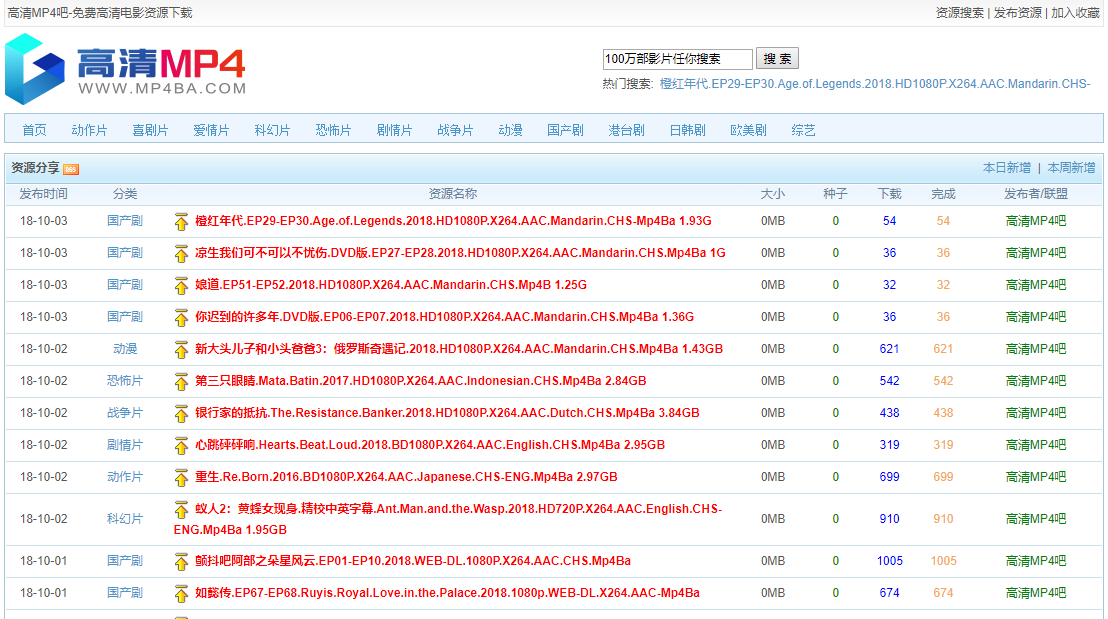
说明:一个质量很好的下载站点,应该是去年严打的那段时间失联的吧,现在复活了,是不是之前的原班人马不得而知。

地址

http://www.mp4ba.com/

截图

image

一同复活的还有http://www.2tu.cc/ 不过打开的时候时不时显示腾讯云的拦截页面。
image

目前只有在线播放的选项了,以前可以迅雷,磁力,小米的

活动说明:
单车月卡生效期间,每次行程前5小时免费,5小时后正常计费。月卡是否可用,以落锁时月卡状态为准
单车月卡仅可抵扣骑行青桔单车、小蓝单车产生的费用
月卡剩余天数小于30天才可免费领取
当前若无月卡,领取后月卡立即生效;当前若已有月卡,领取后有效期顺延
已领取的月卡可在【滴滴客户端】-【我的】-【钱包】中查看,请升级至最新版客户端查看和使用(V5.2.0及以上版本)

优惠简介
滴滴送60次免费骑行单车优惠券,限青桔单车使用。

活动规则
1、领取的优惠券请在滴滴个人账户中查看;
2、优惠券有使用时间限制,请在有效期内使用;
3、如优惠券未到账,将自动在24小时补发,同一用户限使用1份礼包;

活动地址:http://t.cn/Ev7GmBY