标签 服务器 下的文章

说明:telegram的mtproto最近挂得很快,搜索了下发现用国内机子中转下,同时找到了inner-ss。下面是国内小鸡上的操作,国外的酸酸正常使用的情况。
不仅仅电报可以用,老毛子固件的transocks应该也行,配合gfwlist

1.下载自己服务器对应的版本 https://github.com/ihciah/inner-shadowsocks/releases
2.上传到服务器目录下/root/inner-ss/ 只是举例,按自己实际情况
3.编辑config.json

{
  "listen": "0.0.0.0",
  "port": 23333, #socks5的端口
  "auth": false, #认证默认关闭
  "username": "ihc", #用户名
  "password": "iah", #密码
  "servers": ["ss://RC4-MD5:pass1@ip1:port1", "ss://RC4-MD5:pass2@ip2:port2"], #酸酸服务器
  "maxfail": 3,
  "recovertime": 600,
  "starttimeout": 3,
  "remotetimeout": 120,
  "insidetimeout": 120,
  "whitelistenable": false,
  "whitelistdomains": [".telegram.org"],
  "whitelistips": ["::/0", "0.0.0.0/0", "91.108.4.0/22", "91.108.8.0/22", "91.108.56.0/22", "109.239.140.0/24", "149.154.160.0/20", "149.154.164.0/22", "2001:67c:4e8::/48"]
}

4.开机启动后台运行(Debian8)
vi /etc/rc.local
在"exit 0"前添加一行
nohup /root/inner-ss/inner-ss -c /root/inner-ss/config.json > /dev/null 2>&1 &
给权限
chmod +x /etc/rc.local

说明:路由器新路由3作为客户端frpc,Google cloud香港有公网IP安装服务端frps

vps上安装服务端

1.下载服务端

#切换到root目录下
cd /root
#下载0.21版本
wget --no-check-certificate https://github.com/fatedier/frp/releases/download/v0.21.0/frp_0.21.0_linux_amd64.tar.gz
#解压
tar -xzvf frp_0.21.0_linux_amd64.tar.gz
#文件夹重命名
mv frp_0.21.0_linux_amd64 frp
#进入frp目录
cd frp
#赋予权限
chmod +x frps
#执行帮助命令测试frp是否能运行
./frps --help

2.写入配置文件

echo "[common]
bind_port = 7000
token = 12345678
dashboard_port = 7500
dashboard_user = admin
dashboard_pwd = admin
vhost_http_port = 10080
vhost_https_port = 10443
subdomain_host = sixu.life" > frps.ini

3.测试运行frps
./frps -c frps.ini
ctrl+c退出
4.开机启动

#编辑 开机启动文件
vi /etc/rc.local
#按 i 进入编辑模式并添加下面的命令到 exit 0 语句之前
nohup /root/frp/frps -c /root/frp/frps.ini &
#按 esc 退出编辑模式再按 :wq 保存并退出

路由器上配置

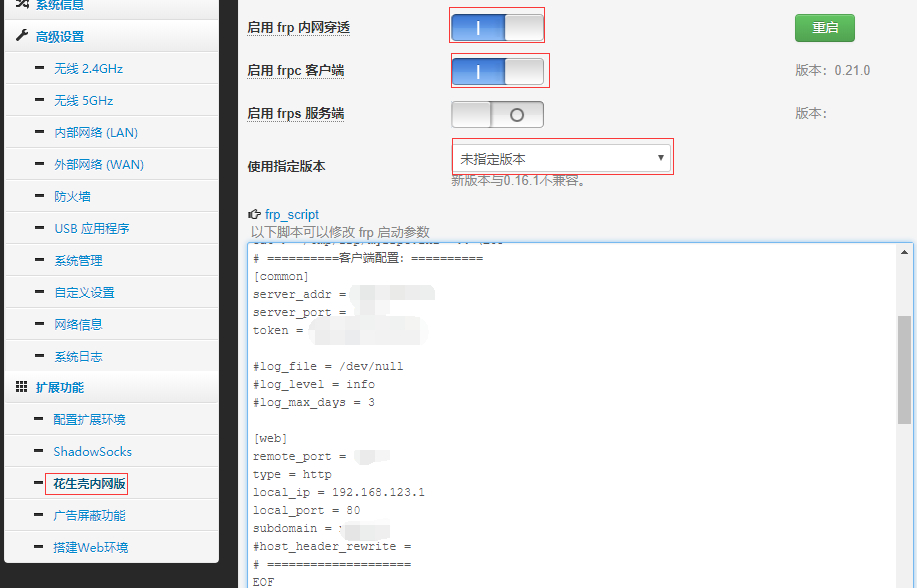
1.依次点击:花生壳内网版--frp
启用 frp 内网穿透 选中
启用 frpc 客户端 选中
2.修改配置文件

# ==========客户端配置:==========
[common]
server_addr = 对应服务器IP地址
server_port = 对应服务端的 bind_port
token = 对应服务端 token

#log_file = /dev/null
#log_level = info
#log_max_days = 3

[web]
remote_port = 对应服务端vhost_http_port
type = http
local_ip = 192.168.123.1
local_port = 80
subdomain = 自定义子域名,例如test.sixu.life,则此处自需要输入test
#host_header_rewrite = 
# ====================
EOF

3.点击应用本页设置
4.运行成功会看到类似的提示

login to server success, get run id [], server udp port [0]
start proxy success

image

域名解析

为了方便,可直接添加泛解析 * a记录指向服务器IP

其他

例如上文的设置来说:
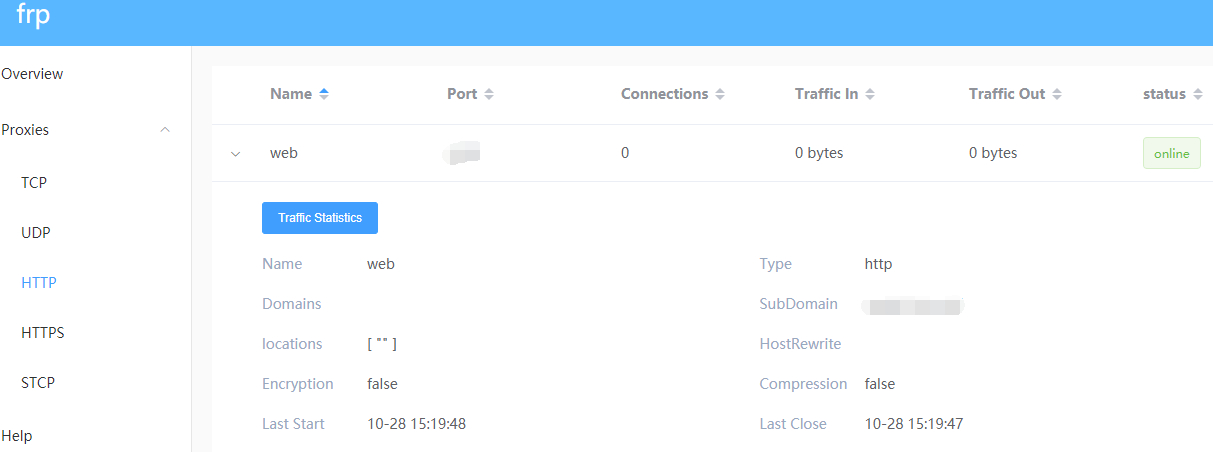
1.登录服务端的 dashboard 的地址为:服务器ip:7500
2.外网访问地址为:test.sixu.life:10080
image

说明:ss-panel-v3使用的SMTP发邮件,之前阿里云国际版用465端口正常,迁移到DigitalOcean不能使用25和465给客服发ticket,得到的回复如下:

[scode type="share"]Thank you for reaching out to us. We're very sorry that you are facing issues with SMTP.

Stopping spam is a constant fight and due to this, your account has restrictions specifically on ports 25 and 465. However, you are be able to send out mail using port 587. You will need to open the port in your firewall.

We realize this is inconvenient, but many customers in your position move their mailing activities to a third party service such as SendGrid or similar which processes such mail separately from their droplet. I'm sorry for the frustration but we're not able to lift these port restrictions at this time.

In terms of a workaround, here are a few alternatives:

  1. Utilize port 587 for SMTP relay via another mail provider, for example G Suite/Gmail, Mailgun, etc. We have a guide on doing so using Postfix here:

https://www.digitalocean.com/community/tutorials/how-to-set-up-a-mail-relay-with-postfix-and-mailgun-on-ubuntu-16-04

  1. Configure your app or service to send mail directly using either a SMTP client connection (typically using port 587), or API call via another mail provider such as Sendgrid, Mailgun, Mandrill, etc.

Please note that with this restriction in place on port 25, mail servers hosted here will be unable to directly relay email to other mail servers, as communication between mail servers typically takes place on port 25.

We think the API is the best solution, as it is honestly more scalable and what we would use if we wanted to "future proof" the project.

Please feel free to reach out to us via this ticket if you have further queries or concerns, we will be around to help you out!

Regards,

Saurabh
Developer Support Specialist - DigitalOcean

(Check out our fantastic community articles: https://www.digitalocean.com/community)[/scode]
所以决定使用Gmail的587来发送邮件。

开启IMAP

1.在计算机上打开 Gmail。
2.点击右上方的“设置”图标。
3.点击转发和 POP/IMAP 标签。
4.在“IMAP 访问”部分,点击启用 IMAP。
5.点击保存更改。

开启安全性较低的应用的访问权限

直达链接:https://myaccount.google.com/lesssecureapps

SMTP设置

发送邮件 (SMTP) 服务器:smtp.gmail.com
要求 SSL:是
要求 TLS:是(如适用)
使用身份验证:是
TLS/STARTTLS 端口:587
完整名称或显示名称:您的姓名
帐号名、用户名或电子邮件地址:您的完整电子邮件地址
密码:您的 Gmail 密码
说明:搬家到do了,之前是php5.4,这次新服务器装的7.0,打开网站就提示Database Server Error

解决方法

修改根网站目录下的config.inc.php文件

$db = new Typecho_db("Mysql","typecho_"); #修改这句代码,在55行
$db = new Typecho_db("Pdo_Mysql","typecho_"); #改为Pdo_Mysql

说明:此服务器为 錢爸爸 赠送,只说了是飓风kvm的,给了root和密码,具体无法验证。本文主要说下了解新买服务器的大概内容。

官网

飓风KVM:https://www.cyclonekvm.com/

测试IP

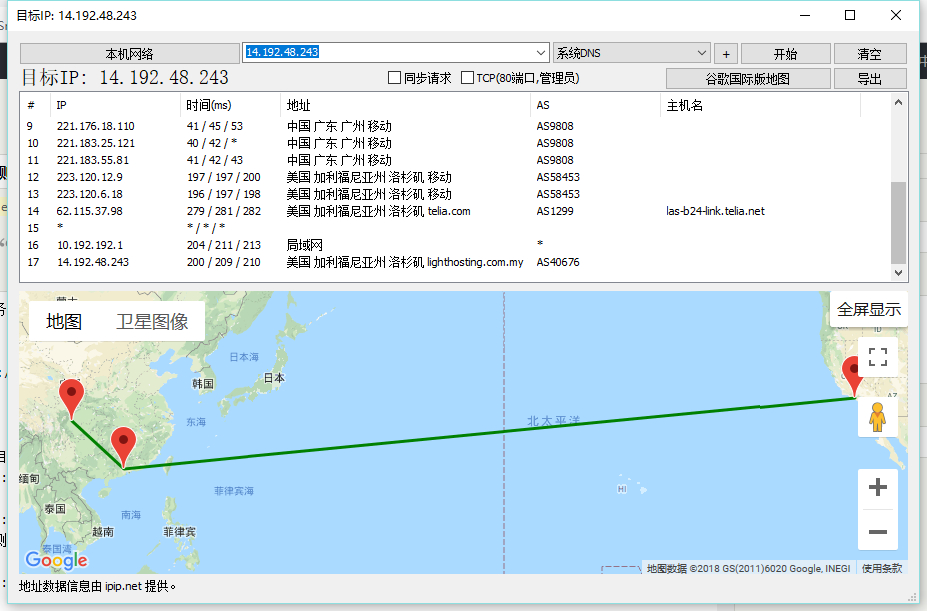
14.192.48.243

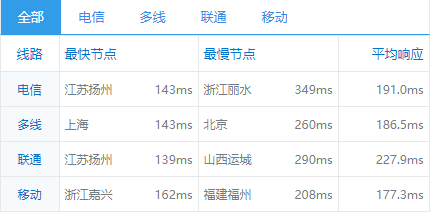
全国ping

ping越小越好,自用的话用自己电脑ping下就ok,做站或其他用途需要大概了解下国内其他地区的延迟
image

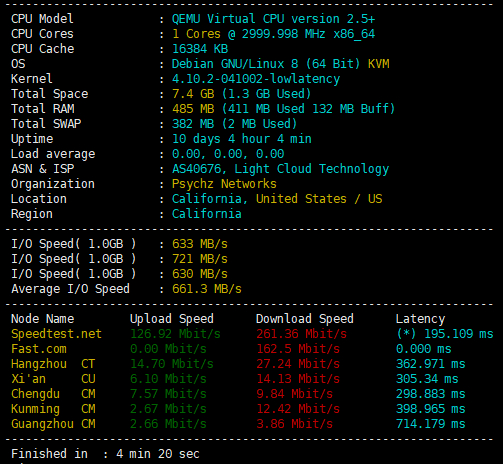
脚本测试结果

image

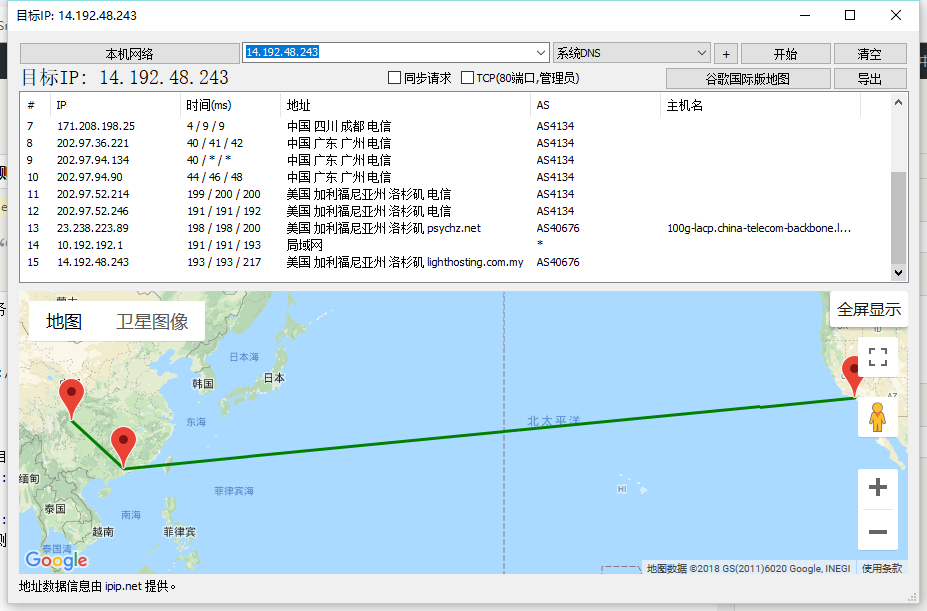
Traceroute测试

电信
image

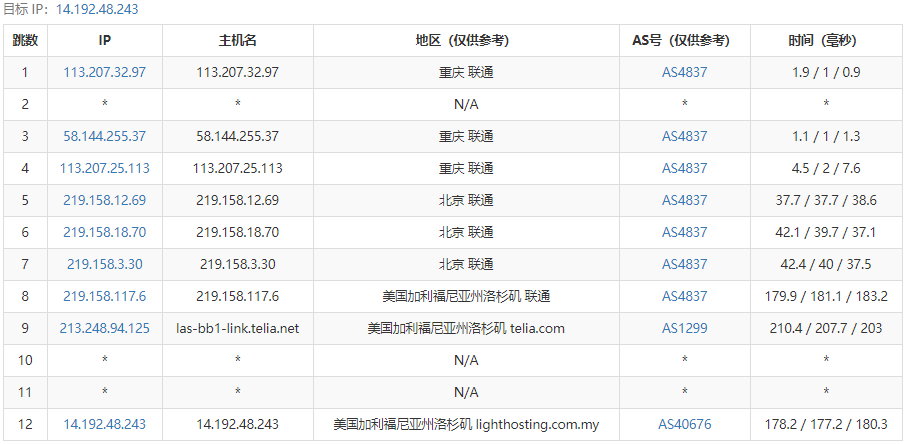
联通
image

移动
image

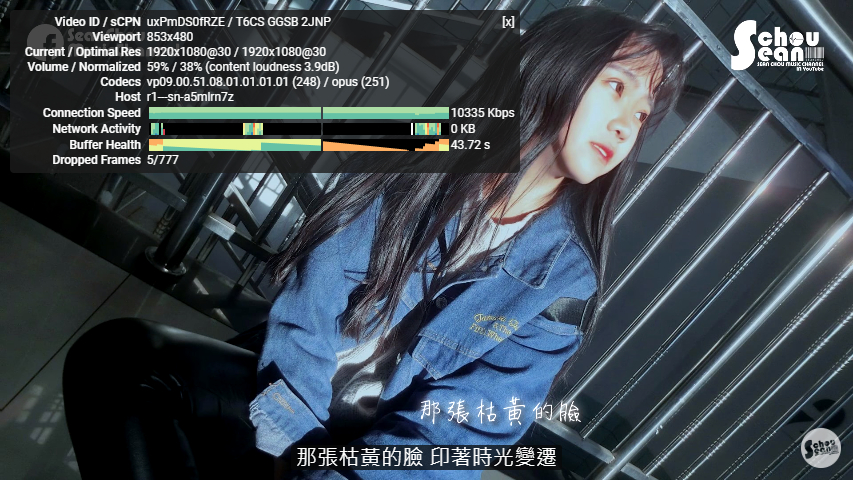
科学上网

酸酸乳
ssr://dXM0LnNpeHUubWw6MTgyNTQ6b3JpZ2luOnJjNC1tZDU6cGxhaW46UkZJelMwNUMvP29iZnNwYXJhbT0mcHJvdG9wYXJhbT0mcmVtYXJrcz01NzZPNVp1OUlPYTBtLWFkaWVlZnRpQXRJT2FVci1hTWdVNWxkR1pzYVhnJmdyb3VwPTVxS3Y1YTJR/
酸酸
ss://cmM0LW1kNTpEUjNLTkI@us4.sixu.ml:18254/#%E6%A2%AF%E5%AD%90%20-%20%E7%BE%8E%E5%9B%BD%20%E6%B4%9B%E6%9D%89%E7%9F%B6%20-%20%E6%94%AF%E6%8C%81Netflix

相关链接

Linux测速:https://sixu.life/linux-speed.html
多个地点Ping检测:http://ping.chinaz.com/

使用cloudflare解析域名

更改域名ns服务器为cloudflare,通过cdn来获得魔法加成
安装v2ray之前,云朵点灰,即是 DNS only

安装 V2Ray

一键安装脚本
bash <(curl -s -L https://233blog.com/v2ray.sh)
传输协议选择 WebSocket + TLS (即是选择 4 )
V2Ray 端口随便,不要是 80 和 443 即可
然后输入你的域名
域名解析 Y
自动配置 TLS 也是 Y
其他直接回车

设置 Crypto 和 开启中转

确保 Cloudflare 的 Crypto 选项卡的 SSL 为 Full
并且 Universal SSL 要为 Active Certificate
然后在 DNS 选项卡那里,把刚才点灰的那个云朵图标,点亮它,云朵图标务必为橙色状态,即是 DNS and HTTP proxy(CDN)

v2ray 常用命令

v2ray menu #管理 V2Ray (同等于直接输入 v2ray)
v2ray info #查看 V2Ray 配置信息
v2ray config #修改 V2Ray 配置
v2ray link #生成 V2Ray 客户端配置文件链接
v2ray textlink 生成 V2Ray 配置信息链接
v2ray qr #生成 V2Ray 配置二维码链接
v2ray ss #修改 Shadowsocks 配置
v2ray ssinfo #查看 Shadowsocks 配置信息
v2ray ssqr #生成 Shadowsocks 配置二维码链接
v2ray status #查看 V2Ray 运行状态
v2ray start #启动 V2Ray
v2ray stop #停止 V2Ray
v2ray restart #重启 V2Ray
v2ray log #查看 V2Ray 运行日志
v2ray update #更新 V2Ray
v2ray update.sh #更新 V2Ray 管理脚本
v2ray uninstall #卸载 V2Ray

注意

如果提示 curl: command not found ,那是因为你的小鸡没装 Curl
ubuntu/debian 系统安装 Curl 方法:
apt-get update -y && apt-get install curl -y
centos 系统安装 Curl 方法:
yum update -y && yum install curl -y
安装好 curl 之后再使用脚本

注意事项

不支持OpenVZ的虚拟化构架
只适用于由GRUB引导的VPS
重装前请务必备份好重要数据,后果自负
重装需要20-40分钟不等的时间,期间无法连接服务器,请耐心等待,有vnc的面板可以通过vnc查看安装进度

原系统安装必备软件

Debian / Ubuntu 系统:

apt-get update
apt-get install -y gawk sed grep

RHEL / CentOS 系统:

yum install -y gawk sed grep

下载脚本

wget --no-check-certificate -qO DebianNET.sh 'https://moeclub.org/attachment/LinuxShell/DebianNET.sh' && chmod -x DebianNET.sh

使用方法

安装Debian 7 32位:
bash DebianNET.sh -d 7 -v 32 -a
安装Debian 7 64位:
bash DebianNET.sh -d 7 -v 64 -a
安装Debian 8 32位:
bash DebianNET.sh -d 8 -v 32 -a
安装Debian 8 64位:
bash DebianNET.sh -d 8 -v 64 -a
安装Debian 9 32位:
bash DebianNET.sh -d 9 -v 32 -a
安装Debian 9 64位:
bash DebianNET.sh -d 9 -v 64 -a

修改密码

默认root密码:MoeClub.org,安装完成后请立即更改密码.
passwd root

参考:https://www.zhujiboke.com/2017/09/803.html

Debian OpenVZ 魔改 BBR - lkl-rinetd 一键脚本

测试机器:
nfphosting 512m Debian GNU/Linux 7 (64 Bit) OpenVZ

要求以下:
OpenVZ 64 bit Ram >> 64M

Debian or Ubuntu
适用于 单网卡(单 IP) 服务器:

wget https://github.com/tcp-nanqinlang/lkl-rinetd/releases/download/1.1.0/tcp_nanqinlang-rinetd-debianorubuntu.sh
bash tcp_nanqinlang-rinetd-debianorubuntu.sh

适用于 多网卡(多 IP) 服务器,会为所有网卡(所有 IP)提供加速:

wget https://github.com/tcp-nanqinlang/lkl-rinetd/releases/download/1.1.0/tcp_nanqinlang-rinetd-debianorubuntu-multiNIC.sh
bash tcp_nanqinlang-rinetd-debianorubuntu-multiNIC.sh

在 /home/tcp_nanqinlang 进行安装,所以安装完成后不要动这个文件夹了(除非你想修改端口)。
vi /home/tcp_nanqinlang/config-port.conf
安装过程中,会提示输入端口号。多个端口号用空格隔开。不支持端口段。

2018年8月17日22点08分测试图
image

参考:https://github.com/tcp-nanqinlang/wiki/wiki/lkl-rinetd