扒了ihewro大佬的邮件通知模版
先来个效果图: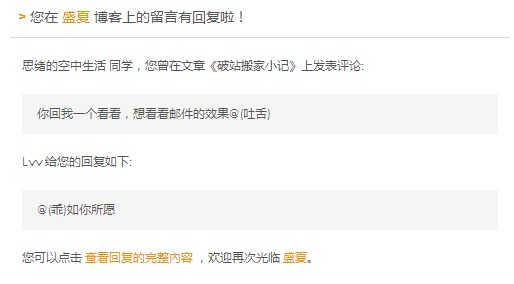
在CommentToMail插件设置里面分别修改guest.html和owner.html就行了。
guest.html:
<div class="nui-fClear sR0">
<br />
<table style="width: 99.8%;height:99.8% ">
<tbody>
<tr>
<td style="background:#FAFAFA">
<div style="background-color:white;border-left: 2px solid #555555;box-shadow:0 1px 3px #AAAAAA;line-height:180%;padding:0 15px 12px;width:500px;margin:50px auto;color:#555555;font-family:'Century Gothic','Trebuchet MS','Hiragino Sans GB',微软雅黑,'Microsoft Yahei',Tahoma,Helvetica,Arial,'SimSun',sans-serif;font-size:12px;">
<h2 style="border-bottom:1px solid #DDD;font-size:14px;font-weight:normal;padding:13px 0 10px 8px;"><span style="color: #f59200;font-weight: bold;">> </span>您在 <a style="text-decoration:none;color: #f59200;" href="http://www.ihewro.com">友人C</a> 博客上的留言有回复啦!</h2>
<div style="padding:0 12px 0 12px;margin-top:18px">
<p>{author_p} 同学,您曾在文章《{title}》上发表评论:</p>
<p style="background-color: #f5f5f5;border: 0px solid #DDD;padding: 10px 15px;margin:18px 0">{text_p}</p>
<p>{author} 给您的回复如下:</p>
<p style="background-color: #f5f5f5;border: 0px solid #DDD;padding: 10px 15px;margin:18px 0">{text}</p>
<p>您可以点击 <a style="text-decoration:none; color:#f59200" href="{permalink}">查看回复的完整內容 </a>,欢迎再次光临 <a style="text-decoration:none; color:#f59200" href="http://www.ihewro.com">友人C</a>。</p>
</div>
</div> </td>
</tr>
</tbody>
</table>
<br />
<br />
</div>owner.html:
<div class="nui-fClear sR0">
<br />
<table style="width: 99.8%;height:99.8% ">
<tbody>
<tr>
<td style="background:#FAFAFA">
<div style="background-color:white;border-left: 2px solid #555555;box-shadow:0 1px 3px #AAAAAA;line-height:180%;padding:0 15px 12px;width:500px;margin:50px auto;color:#555555;font-family:'Century Gothic','Trebuchet MS','Hiragino Sans GB',微软雅黑,'Microsoft Yahei',Tahoma,Helvetica,Arial,'SimSun',sans-serif;font-size:12px;">
<h2 style="border-bottom:1px solid #DDD;font-size:14px;font-weight:normal;padding:13px 0 10px 8px;"><span style="color: #f59200;font-weight: bold;">> </span><a style="text-decoration:none;color: #f59200;" href="http://www.ihewro.com">友人C</a> 博客有新的评论啦! </h2>
<div style="padding:0 12px 0 12px;margin-top:18px">
<p>{author} 同学在文章《{title}》上发表评论:</p>
<p style="background-color: #f5f5f5;border: 0px solid #DDD;padding: 10px 15px;margin:18px 0">{text}</p>
<p>您可以点击 <a style="text-decoration:none; color:#f59200" href="{permalink}">查看评论的完整內容 </a>,欢迎再次光临 <a style="text-decoration:none; color:#f59200" href="http://www.ihewro.com">友人C</a>。</p>
</div>
</div> </td>
</tr>
</tbody>
</table>
<br />
<br />
</div>