标签 网址 下的文章

说明:和套cf一样,只不过这次套的是腾讯云cdn,每个月有免费的10g,新用户注册送50g连送6个月。由于要套腾讯云cdn,所以域名要求是备案过的。
联通适用

宝塔面板添加网站

1.输入自己的网址,ftp、数据库、php都不用
2.申请ssl
点击「设置」——SSL——Let’s Encrypt,成功申请SSL后,保存
3.更改 配置文件
再次点击站点「设置」的「配置文件」选项,在最后一个}前添加如下代码:

    location / {
    proxy_redirect off;
    proxy_pass http://127.0.0.1:25534;#25534是v2ray的端口号,注意和之后安装的一致
    proxy_http_version 1.1;
    proxy_set_header Upgrade $http_upgrade;
    proxy_set_header Connection "upgrade";
    proxy_set_header Host $http_host;
    }

4.面板首页重启Nignx

安装v2ray

1.安装命令
bash <(curl -L -s https://install.direct/go.sh)
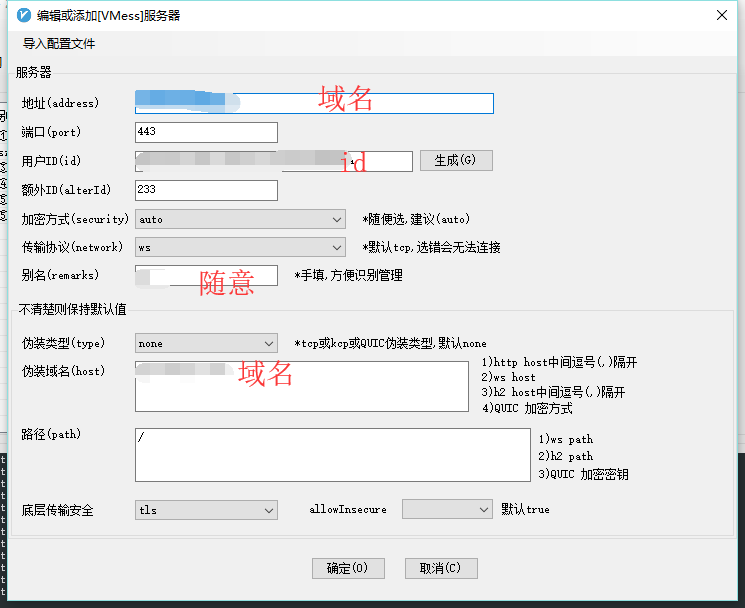
2.修改v2ray配置文件,路径/etc/v2ray/config.json,修改后记得重启v2ray
参考配置:

{
    "log": {
        "access": "/var/log/v2ray/access.log",
        "error": "/var/log/v2ray/error.log",
        "loglevel": "warning"
    },
    "inbound": {
        "port": 25534,#自己的端口号需要对应
        "protocol": "vmess",
        "settings": {
            "udp": true,
            "clients": [
                {
                    "id": "e5cee2d4-d28b-4b8a-83ef-cf788bf1****",#自己的id
                    "level": 1,
                    "alterId": 233
                }
            ]
        },
        "streamSettings": {
            "network": "ws"
        }
    },
    "outbound": {
        "protocol": "freedom",
        "settings": {}
    },
    "outboundDetour": [
        {
            "protocol": "blackhole",
            "settings": {},
            "tag": "blocked"
        }
    ],
    "routing": {
        "strategy": "rules",
        "settings": {
            "rules": [
                {
                    "type": "field",
                    "ip": [
                        "0.0.0.0/8",
                        "10.0.0.0/8",
                        "100.64.0.0/10",
                        "127.0.0.0/8",
                        "169.254.0.0/16",
                        "172.16.0.0/12",
                        "192.0.0.0/24",
                        "192.0.2.0/24",
                        "192.168.0.0/16",
                        "198.18.0.0/15",
                        "198.51.100.0/24",
                        "203.0.113.0/24",
                        "::1/128",
                        "fc00::/7",
                        "fe80::/10"
                    ],
                    "outboundTag": "blocked"
                }
            ]
        }
    }
}

3.重启V2Ray
service v2ray restart

腾讯云cdn设置

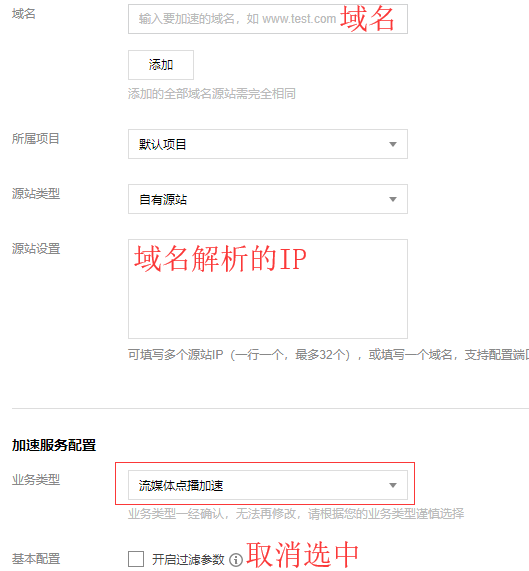
1.添加域名 https://console.cloud.tencent.com/cdn/access
2.源站填写IP,需要注意的是:加速类型选择流媒体点播加速
TIM截图20190611205030.png
3.https配置
高级配置,添加Https。
ssl证书直接从之前的宝塔面板复制过来,腾讯云的‘证书内容’对应宝塔的‘证书(PEM格式)’注意复制过来之后中间有一行空格需要手动删除;腾讯云的‘私钥内容’对应宝塔的‘密钥(KEY)’
回源记得选择协议跟随
4.访问控制-把过滤参数关闭
缓存配置-全部改成0
回源设置-关闭Range回源

域名解析

在自己的域名解析服务商添加‘CNAME’记录

TIM截图20190611210821.png

使用

开全局模式
TIM截图20190611211221.png

参考:
https://sumrday.net/exp/lt-xyml.html
https://jdbblog.top/84.html

前言:
v2ray通过cloudflare拯救被封的IP,之前一直用的233blog的一键脚本,奈何nfp的ovz换了4次系统都没能成功实现,所以手动搭建了,顺便开个记录贴

域名解析

1.使用cloudflare解析域名,为了方便测试,可以先把云朵点灰、关闭cdn(非必要,如果点灰了最后记得再次点亮云朵图标开启cdn)

安装宝塔面板

1.根据自己的系统使用正确的命令安装:

Centos安装命令
yum install -y wget && wget -O install.sh http://download.bt.cn/install/install.sh && sh install.sh

Debian安装命令
wget -O install.sh http://download.bt.cn/install/install-ubuntu.sh && bash install.sh

2.安装完成后,登录BT面板,安装nginx
3.添加站点
输入自己的网址,ftp、数据库、php都不用
4.申请ssl
点击「设置」——SSL——Let’s Encrypt,成功申请SSL后,保存
5.更改 配置文件
再次点击站点「设置」的「配置文件」选项,在最后一个}前添加如下代码:

    location / {
    proxy_redirect off;
    proxy_pass http://127.0.0.1:25534;#25534是v2ray的端口号,注意和之后安装的一致
    proxy_http_version 1.1;
    proxy_set_header Upgrade $http_upgrade;
    proxy_set_header Connection "upgrade";
    proxy_set_header Host $http_host;
    }

6.重启Nignx

安装v2ray

1.安装命令
bash <(curl -L -s https://install.direct/go.sh)
2.修改v2ray配置文件,路径/etc/v2ray/config.json,修改后记得重启v2ray
参考配置:

{
    "log": {
        "access": "/var/log/v2ray/access.log",
        "error": "/var/log/v2ray/error.log",
        "loglevel": "warning"
    },
    "inbound": {
        "port": 25534,#自己的端口号需要对应
        "protocol": "vmess",
        "settings": {
            "udp": true,
            "clients": [
                {
                    "id": "e5cee2d4-d28b-4b8a-83ef-cf788bf1****",#自己的id
                    "level": 1,
                    "alterId": 233
                }
            ]
        },
        "streamSettings": {
            "network": "ws"
        }
    },
    "outbound": {
        "protocol": "freedom",
        "settings": {}
    },
    "outboundDetour": [
        {
            "protocol": "blackhole",
            "settings": {},
            "tag": "blocked"
        }
    ],
    "routing": {
        "strategy": "rules",
        "settings": {
            "rules": [
                {
                    "type": "field",
                    "ip": [
                        "0.0.0.0/8",
                        "10.0.0.0/8",
                        "100.64.0.0/10",
                        "127.0.0.0/8",
                        "169.254.0.0/16",
                        "172.16.0.0/12",
                        "192.0.0.0/24",
                        "192.0.2.0/24",
                        "192.168.0.0/16",
                        "198.18.0.0/15",
                        "198.51.100.0/24",
                        "203.0.113.0/24",
                        "::1/128",
                        "fc00::/7",
                        "fe80::/10"
                    ],
                    "outboundTag": "blocked"
                }
            ]
        }
    }
}

3.V2Ray可使用的命令:

sudo service v2ray start #启动V2Ray
sudo service v2ray stop #停止运行V2Ray
sudo service v2ray restart #重启V2Ray
sudo service v2ray status #查看V2Ray状态

背景

之前用的linhaoyi.com这个域名,现在用sixu.life这个域名,原linhaoyi.com跳到sixu.life,www.linhaoyi.com是另外一个站。linhaoyi.com和www.linhaoyi.com是同时解析到阿里云虚机的。

Header跳转

这段代码添加在typecho的主题文件header.php文件中。

<?php
     if($_SERVER['HTTP_HOST'] == 'linhaoyi.com'){
    $url = "https://sixu.life".$_SERVER["REQUEST_URI"]; 
    Header("Location:$url"); 
    }
?>

上面代码中linhaoyi.com是旧网址,sixu.life是要跳转的目标地址。这个代码的好处就是www.linhaoyi.com进来的用户可以正常访问typecho博客内容,而从linhaoyi.com进来的直接跳走。

.HTACCESS跳转

.HTACCESS保存在网站当前域名的根目录

RewriteEngine on
RewriteRule ^(.*)$ https://sixu.life/$1 [R=301,L]

注意修改上面的网址 sixu.life 为你新站点的地址URL,这样就可以实现全站301

google站长工具里面重新添加新域名和sitemap