思绪的空中生活 发布的文章

116.77.73.77 中国广东深圳 天威视讯/联通

CCTV-2,http://ip/otv/tw/live/channel13/800.m3u8 
CCTV-3,http://ip/otv/tw/live/channel92/800.m3u8 
CCTV-4,http://ip/otv/tw/live/channel32/800.m3u8 
CCTV-6,http://ip/otv/tw/live/channel98/800.m3u8 
CCTV-8,http://ip/otv/tw/live/channel88/800.m3u8 
CCTV-9,http://ip/otv/tw/live/channel38/800.m3u8 
CCTV-10,http://ip/otv/tw/live/channel87/800.m3u8 
CCTV-11,http://ip/otv/tw/live/channel23/800.m3u8 
CCTV-12,http://ip/otv/tw/live/channel41/800.m3u8 
CCTV-13,http://ip/otv/tw/live/channel31/800.m3u8 
CCTV-14,http://ip/otv/tw/live/channel28/800.m3u8
CCTV5+,http://ip/otv/tw/live/channel20/800.m3u8 
CETV-1,http://ip/otv/tw/live/channel48/800.m3u8 
DV生活,http://ip/otv/tw/live/channel42/800.m3u8 
世界地理,http://ip/otv/tw/live/channel34/800.m3u8 
东南卫视,http://ip/otv/tw/live/channel27/800.m3u8 
东方卫视,http://ip/otv/tw/live/channel93/800.m3u8 
云南卫视,http://ip/otv/tw/live/channel15/800.m3u8 
兵团卫视,http://ip/otv/tw/live/channel47/800.m3u8 
北京卫视,http://ip/otv/tw/live/channel91/800.m3u8 
吉林卫视,http://ip/otv/tw/live/channel25/800.m3u8 
四川卫视,http://ip/otv/tw/live/channel18/800.m3u8 
天津卫视,http://ip/otv/tw/live/channel24/800.m3u8 
宁夏卫视,http://ip/otv/tw/live/channel46/800.m3u8 
安徽卫视,http://ip/otv/tw/live/channel17/800.m3u8 
山东卫视,http://ip/otv/tw/live/channel26/800.m3u8 
山西卫视,http://ip/otv/tw/live/channel21/800.m3u8 
广东体育,http://ip/otv/tw/live/channel14/800.m3u8 
广东公共,http://ip/otv/tw/live/channel51/800.m3u8 
新疆卫视,http://ip/otv/tw/live/channel49/800.m3u8 
旅游卫视,http://ip/otv/tw/live/channel33/800.m3u8 
江苏卫视,http://ip/otv/tw/live/channel94/800.m3u8 
江西卫视,http://ip/otv/tw/live/channel22/800.m3u8 
河北卫视,http://ip/otv/tw/live/channel40/800.m3u8 
河南卫视,http://ip/otv/tw/live/channel37/800.m3u8 
浙江卫视,http://ip/otv/tw/live/channel90/800.m3u8 
深圳体育健康,http://ip/otv/tw/live/channel95/800.m3u8 
深圳卫视,http://ip/otv/tw/live/channel12/800.m3u8 
深圳卫视,http://ip/otv/tw/live/channel97/800.m3u8 
深圳电视剧,http://ip/otv/tw/live/channel10/800.m3u8 
深圳都市,http://ip/otv/tw/live/channel96/800.m3u8 
湖北卫视,http://ip/otv/tw/live/channel29/800.m3u8 
湖南卫视,http://ip/otv/tw/live/channel89/800.m3u8 
珠江频道,http://ip/otv/tw/live/channel30/800.m3u8 
甘肃卫视,http://ip/otv/tw/live/channel45/800.m3u8 
西藏卫视,http://ip/otv/tw/live/channel44/800.m3u8 
贵州卫视,http://ip/otv/tw/live/channel43/800.m3u8 
辽宁卫视,http://ip/otv/tw/live/channel16/800.m3u8 
陕西卫视,http://ip/otv/tw/live/channel11/800.m3u8 
黑龙江卫视,http://ip/otv/tw/live/channel39/800.m3u8 

直播源收集自网络,具有时效性,无效或者有补充的请在文章下方留言

背景

更新rom之后就失效了,使用修复命令sh /userdisk/llmp/manager/llmp_fix.sh也无效

分析原因

1.ssh到192.168.31.1:3333能正常连接。
2.执行:ps | grep lighttpd只看到一个进程。
image
3.使用/usr/sbin/lighttpd -f /etc/lighttpd/lighttpd.conf命令来开启lighttpd服务时出错,提示端口占用。
image

修改端口

打开userdisk/llmp/etc/lighttpd/lighttpd.conf文件,搜索8080并改为8089,当然,其他没占用的端口也是可以的。
image

测试

修改完之后再次执行/usr/sbin/lighttpd -f /etc/lighttpd/lighttpd.conf命令,不报错即为成功。
使用ps | grep lighttpd查看进程
image
打开192.168.31.1:8089测试网页是否正常。

简介

5hadow5ocksR 多用户版服务端安装记录(S*S-Panel后端)

安装环境

1.centos 7.3
2.阿里云国际版sg

基本库安装

yum update
yum install git -y

获取源代码

git clone -b manyuser https://github.com/ToyoDAdoubi/shadowsocksr.git

注意:根目录的是多用户版(即数据库版)[shadowsocksr];子目录中的是单用户版[shadowsocksr/shadowsocksr]

安装依赖(cymysql)

cd shadowsocksr
# 进入ShadowsocksR根目录
bash setup_cymysql.sh
# 安装Cymysql 依赖
bash initcfg.sh
# 初始化ShadowsocksR服务端

服务端配置

shadowsocksr 根目录内,打开文件vi usermysql.json,输入i进入编辑状态,esc退出编辑,:wq保存退出

"host": "127.0.0.1", //前端mysql域名/IP
"port": 3306, //mysql端口
"user": "ss", //mysql用户名
"password": "pass", //mysql密码
"db": "shadowsocks", //数据库名

注意:host如果在其他主机,要添加本机的访问权限。

配置文件config.json

一般情况下不需要编辑,除非你需要修改 加密方式/协议/混淆等参数。

vi user-config.json

注意:新版ShadowsocksR服务端的 默认加密方式为 aes-128-ctr ,大家注意一下。
"method":"aes-128-ctr", //修改成您要的加密方式的名称
"protocol": "auth_aes128_md5", //修改成您要的协议插件名称
"obfs": "tls1.2_ticket_auth_compatible", //修改成您要的混淆插件名称

服务端运行与停止

python server.py

这句运行代码主要用于调试,关闭ssh后ss后端自动关闭,所以正式使用请使用下面的脚本运行!
如果需要停止请按Ctrl+C键终止程序。

firewall(centos7)的防火墙配置

服务端没有错误,而连接不上,需要检查iptables或firewall(centos7)的防火墙配置

systemctl stop firewalld.service #停止firewall
systemctl disable firewalld.service #禁止firewall开机启动

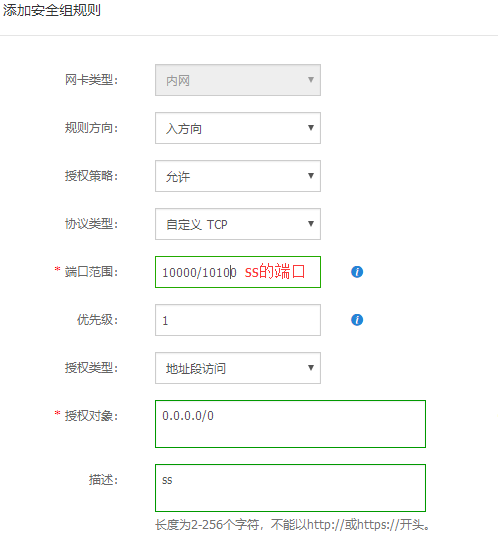
添加安全组规则

1.阿里云控制台中实例选择“管理”
2.依次点击“本实例安全组”=>“配置规则”=>“添加安全组规则”
3.把s*s端口添加进去
image

开机启动

chmod +x /etc/rc.d/rc.local
#首先设置开机启动文件的权限
vi /etc/rc.d/rc.local
#编辑文件,按i进入编辑模式
bash /root/shadowsocksr/run.sh
#添加开机启动命令,按esc退出编辑模式,输入 :wq 保存退出

来源:https://doub.io/ss-jc14/

来源:http://www.grtn.cn/live/

6,广东经济(标清)
7,广东南方卫视
18,音乐先锋榜
25,广东卫视
26,广东珠江
27,广东体育
28,广东新闻
29,嘉佳卡通
30,广东国际
31,广东公共
32,高尔夫频道
33,房产频道
34,汽车会展频道
36,广东综艺
37,广东影视
38,广东少儿
39,新闻广播
40,珠江经济台
41,音乐之声
42,城市之声
43,南方生活广播
44,羊城交通台
45,文体广播
46,股市广播
61,汕头综合
62,佛山综合
63,茂名综合
64,韶关新闻综合
65,肇庆综合
66,梅州综合
67,河源综合
68,潮州综合
69,荔枝财经
70,荔枝娱乐
71,荔枝体育
75,珠海综合
76,东莞综合
77,中山综合
78,惠州综合
79,江门综合
80,湛江综合
81,汕尾综合
82,清远综合
83,揭阳综合
84,阳江综合
85,云浮综合
93,广东经视
95,南方购物
98,广东卫视-高清
118,总控信号组
119,荔枝台活动直播

来源:http://zhibo.pptv.com/

300188,深圳卫视
300162,安徽卫视
300163,江苏卫视
300160,天津卫视
300161,山东卫视
300172,黑龙江卫视
300143,河北卫视
300177,四川卫视
300174,贵州卫视
300167,山西卫视
300178,广西卫视
300176,吉林卫视
300170,陕西卫视
300180,青海卫视
300173,内蒙古卫视
300157,兵团卫视
300187,宁夏卫视
300148,甘肃卫视
300411,新疆卫视
300747,CCTV证券资讯
300406,南方综艺
300449,南方影视
300165,中国教育-1
300149,东方电影频道
300456,广州新闻
300410,广州综合
300451,广州影视
300151,上视新娱乐频道
300156,上视新闻综合
301226,江苏优漫卡通
300153,上视电视剧
300408,广州少儿
300407,南方少儿
300150,上视教育
300593,长沙政法
300155,上视星尚频道
301055,睛彩中原
303537,国学频道
300415,武汉科教生活
300152,上视纪实频道
301041,广东现代教育
300454,上视艺术人文
300214,上视外语频道ICS
301227,家庭理财
300404,南方经济
300409,广州经济
300464,广东房产频道

伪静态作用

美观,seo需要

修改步骤

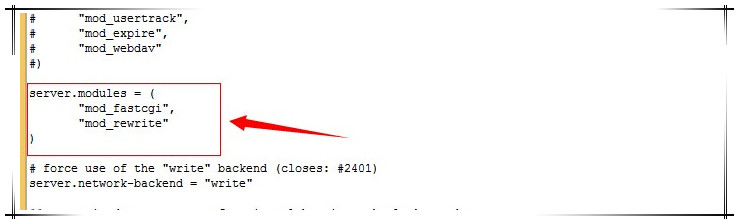
打开 userdisk/llmp/etc/lighttpd/lighttpd.conf 文件
1."mod_fastcgi",的下一行添加"mod_rewrite"
lighttpd
2.增加以下代码

url.rewrite-if-not-file = (
"^/(admin|usr)/(.*)" => "/$1/$2",
"^/(.*)$" => "/index.php/$1"
)

3.重启lighttpd服务,kill pid 或者 重启路由器
方法1.ssh到192.168.31.1:3333 root用户,执行:ps | grep lighttpd
看到那个数字了么这个就是lighttpd的进程PID,下面命令中 字母PID 更换为你的那个数字
Kill PID
kill pid
方法2.重启路由器

注意

修改后,出现网站打不开的情况,用命令ps | grep lighttpd查看是否有/usr/sbin/lighttpd -f /etc/lighttpd/lighttpd.conf进程。如果没有,恢复原文件,重启路由器即可

参考资料:
1.教你在小米路由上也玩一把wordpress伪静态
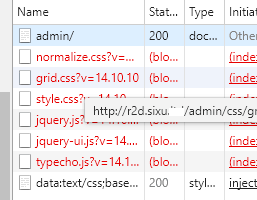
2.lighttpd下关于typecho的3种伪静态规则,亲测可用

前言

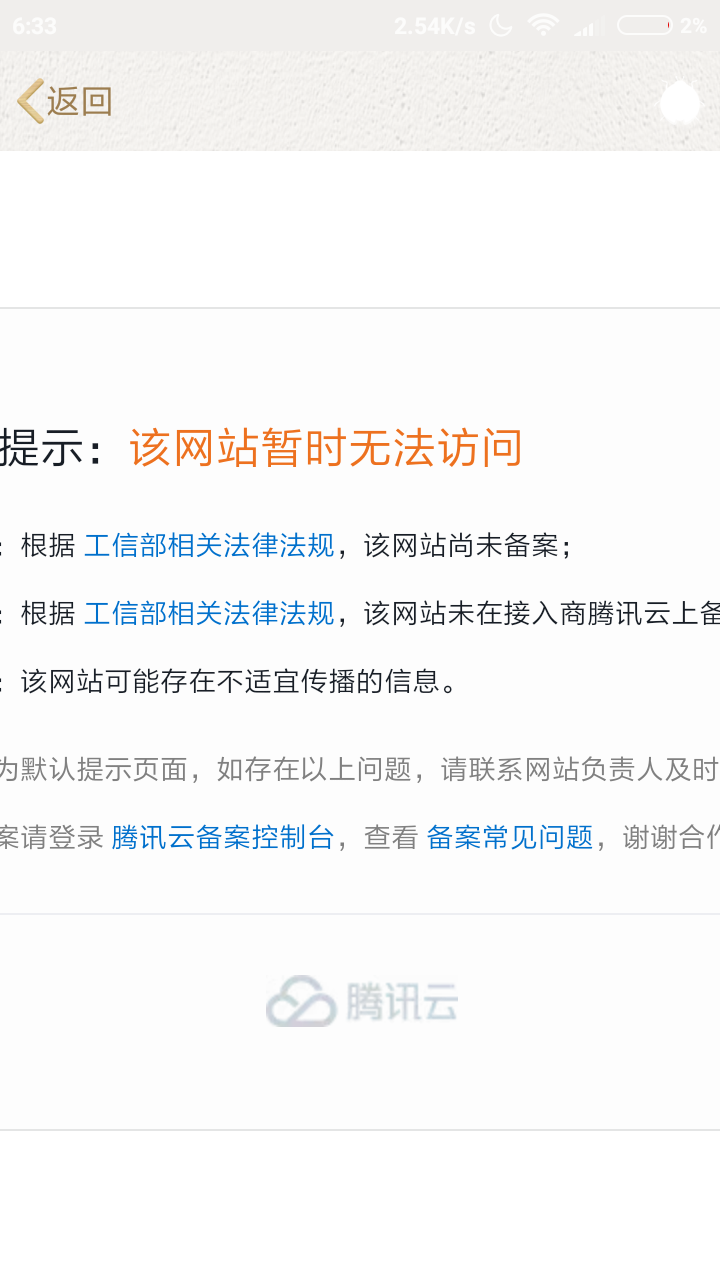
frp内网穿透成功后,访问的时候域名后要加上端口才能访问,不美观。然而配置nginx就可以解决。此篇文章涉及https,因为域名没备案。
image

申请ssl证书

1.地址 腾讯云ssl证书
2.验证域名权限的时候,添加txt最快,大概3分钟证书就能申请下来
image
3.下载证书,解压Nginx出来,下一步用

oneinstack配置

1.ssh登陆服务器,添加虚拟主机,http=>https建议开启

cd oneinstack
./vhost.sh

2.替换ssl证书,先修改下载到的证书名称,用winscp上传到目录
image
3.重新加载nginx
nginx -s reload

修改Virtualhost conf:

1.文件路径:/usr/local/nginx/conf/vhost/域名.conf
2.参考配置,自行修改域名和端口

  server {
  listen 80;
  listen 443 ssl http2;
  ssl_certificate /usr/local/nginx/conf/ssl/域名.crt;
  ssl_certificate_key /usr/local/nginx/conf/ssl/域名.key;
  ssl_protocols TLSv1 TLSv1.1 TLSv1.2;
  ssl_ciphers EECDH+CHACHA20:EECDH+AES128:RSA+AES128:EECDH+AES256:RSA+AES256:EECDH+3DES:RSA+3DES:!MD5;
  ssl_prefer_server_ciphers on;
  ssl_session_timeout 10m;
  ssl_session_cache builtin:1000 shared:SSL:10m;
  ssl_buffer_size 1400;
  add_header Strict-Transport-Security max-age=15768000;
  ssl_stapling on;
  ssl_stapling_verify on;
  server_name 域名;
  access_log /data/wwwlogs/域名_nginx.log combined;
  index index.html index.htm index.php;
  include /usr/local/nginx/conf/rewrite/other.conf;
  root /data/wwwroot/域名;
    location ~ {
    proxy_pass http://127.0.0.1:端口;
    include proxy.conf;
  }
}