思绪的空中生活 发布的文章

vi /etc/apt/sources.list
阿里云源

deb http://mirrors.aliyun.com/debian/ buster main non-free contrib
deb-src http://mirrors.aliyun.com/debian/ buster main non-free contrib
deb http://mirrors.aliyun.com/debian-security buster/updates main
deb-src http://mirrors.aliyun.com/debian-security buster/updates main
deb http://mirrors.aliyun.com/debian/ buster-updates main non-free contrib
deb-src http://mirrors.aliyun.com/debian/ buster-updates main non-free contrib
deb http://mirrors.aliyun.com/debian/ buster-backports main non-free contrib
deb-src http://mirrors.aliyun.com/debian/ buster-backports main non-free contrib

腾讯云源

deb http://mirrors.cloud.tencent.com/debian/ buster main non-free contrib
deb http://mirrors.cloud.tencent.com/debian-security buster/updates main
deb http://mirrors.cloud.tencent.com/debian/ buster-updates main non-free contrib
deb http://mirrors.cloud.tencent.com/debian/ buster-backports main non-free contrib
deb-src http://mirrors.cloud.tencent.com/debian-security buster/updates main
deb-src http://mirrors.cloud.tencent.com/debian/ buster main non-free contrib
deb-src http://mirrors.cloud.tencent.com/debian/ buster-updates main non-free contrib
deb-src http://mirrors.cloud.tencent.com/debian/ buster-backports main non-free contrib

163

deb http://mirrors.163.com/debian/ buster main non-free contrib
deb http://mirrors.163.com/debian/ buster-updates main non-free contrib
deb http://mirrors.163.com/debian/ buster-backports main non-free contrib
deb-src http://mirrors.163.com/debian/ buster main non-free contrib
deb-src http://mirrors.163.com/debian/ buster-updates main non-free contrib
deb-src http://mirrors.163.com/debian/ buster-backports main non-free contrib
deb http://mirrors.163.com/debian-security/ buster/updates main non-free contrib
deb-src http://mirrors.163.com/debian-security/ buster/updates main non-free contrib

更新
apt-get update

换源

vi /etc/apt/sources.list

deb https://mirrors.ustc.edu.cn/debian stretch main contrib non-free
deb https://mirrors.ustc.edu.cn/debian stretch-updates main contrib non-free
deb https://mirrors.ustc.edu.cn/debian stretch-backports main contrib non-free
deb https://mirrors.ustc.edu.cn/debian-security/ stretch/updates main contrib non-free

apt-get update && apt-get upgrade

安装宝塔

https://www.feiji.work/2019/20.html
wget https://www.feiji.work/n1/bt/6.9.4/install.sh && sudo bash install.sh
安装完成可能有错误提示 直接reboot重启
查看面板入口:/etc/init.d/bt default

安装nginx

https://www.feiji.work/2019/41.html

打开ssh(注:如果以下步骤提示缺少文件,可以在宝塔后台执行一次安装Nginx,在下载完脚本后直接取消安装即可。)

cd /www/server/panel/install #如果目录存在nginx 先rm
wget https://www.feiji.work/n1/bt/nginx.sh 下载nginx.sh
sh nginx.sh install #直接安装

安装Nginx出现checking for GD library ... not found错误
https://de.lib.im/linux-gd.html
apt-get -y install libgd2-xpm-dev build-essential重新安装

报错Starting nginx... nginx: [emerg] getpwnam("www") failed in /www/server/nginx/conf/nginx.conf:1
https://blog.csdn.net/rebel_yangke/article/details/58601731
修改/www/server/nginx/conf/nginx.conf 两个www改成root 再重启

pppoe宽带拨号

https://xaolong.com/post/279.html
https://malagege.github.io/blog/2019/01/26/Linux%E4%BD%BF%E7%94%A8pppoe%E9%80%A3%E7%B7%9A%E6%96%B9%E6%B3%95%E5%B0%8F%E8%A8%98/

apt install pppoeconf -y
apt install isc-dhcp-server -y

vi /etc/default/isc-dhcp-server
#将INTERFACESv4=""修改为INTERFACESv4="br0"
#在INTERFACESv6=""的前面加个#,修改为#INTERFACESv6=""

mv /etc/dhcp/dhcpd.conf /etc/dhcp/dhcpd.conf.bak

vi /etc/dhcp/dhcpd.conf  ###里面的所有内容
###
option domain-name "phicomm-n1";
option domain-name-servers 119.29.29.29;
subnet 192.168.1.0 netmask 255.255.255.0 {
    range 192.168.1.101 192.168.1.254;
    option subnet-mask 255.255.255.0;
    option broadcast-address 192.168.1.255;
    option routers 192.168.1.2;
    option domain-name-servers 119.29.29.29;
}
default-lease-time 600;
max-lease-time 7200;
authoritative;
###

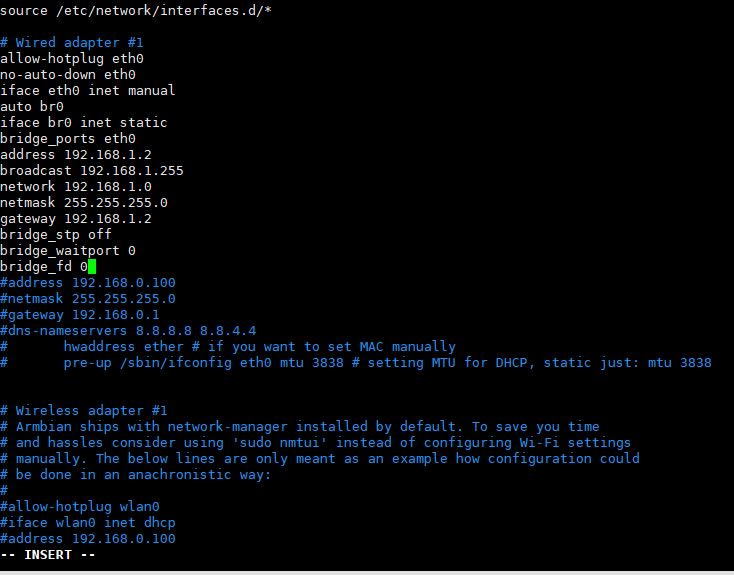
vi /etc/network/interfaces
#iface eth0 inet dhcp 改为iface eth0 inet manual 后面增加以下内容 ###里面的全部 见图一
###
auto br0
iface br0 inet static
bridge_ports eth0
address 192.168.1.2
broadcast 192.168.1.255
network 192.168.1.0
netmask 255.255.255.0
gateway 192.168.1.2
bridge_stp off              
bridge_waitport 0           
bridge_fd 0
###

vi /etc/sysctl.conf
#去掉net.ipv4.ip_forward=1前面的#号

sysctl -p

vi  /etc/rc.local
#在 exit 0 前一行加以下内容
iptables -t nat -A POSTROUTING -j MASQUERADE

reboot

批注 2019-12-29 185147.png

n1接光猫 #n1已经固定IP 192.168.1.2

pppoeconf #进入拨号向导
#第一个选no
#删除username 输入宽带账号
#输入宽带密码
#之后全部 yes

poff -a # 關閉全部pppoe

查看状态
plog
ip addr show ppp0

开机自动拨号
vi /etc/rc.local #在 exit 0 前一行加一句:
pon dsl-provider

账号密码配置文件地址/etc/ppp/pap-secrets

动态域名解析dns

https://github.com/NewFuture/DDNS

git clone https://github.com/NewFuture/DDNS
cd DDNS
./run.py #运行一次 生成config.json配置文件
vi config.json #修改 id 域名 token
./task.sh

说明:买了个nat小鸡 装了宝塔面板 默认的8888改了端口才能用
Debian9系统

修改端口

echo '分配的端口' > /www/server/panel/data/port.pl && /etc/init.d/bt restart

防火墙放行端口

ufw allow 上面使用的端口/tcp

安利个v2ray
主要用的微软的服务器 国内百度云中转
33ss.xyz

测速

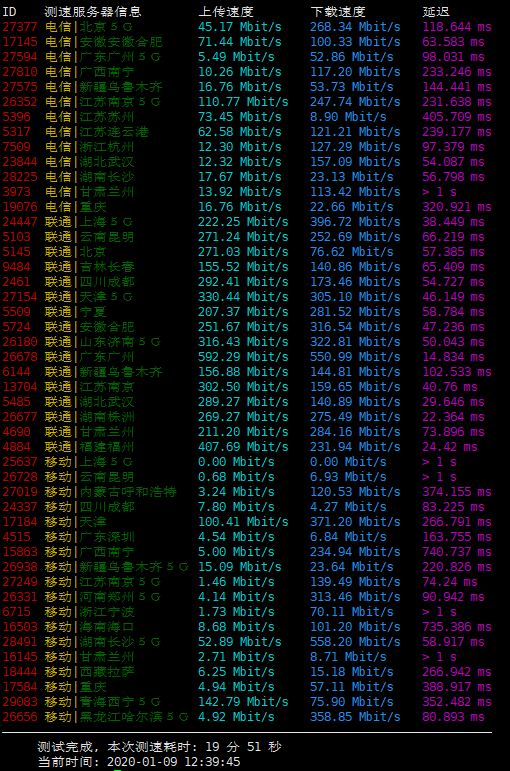
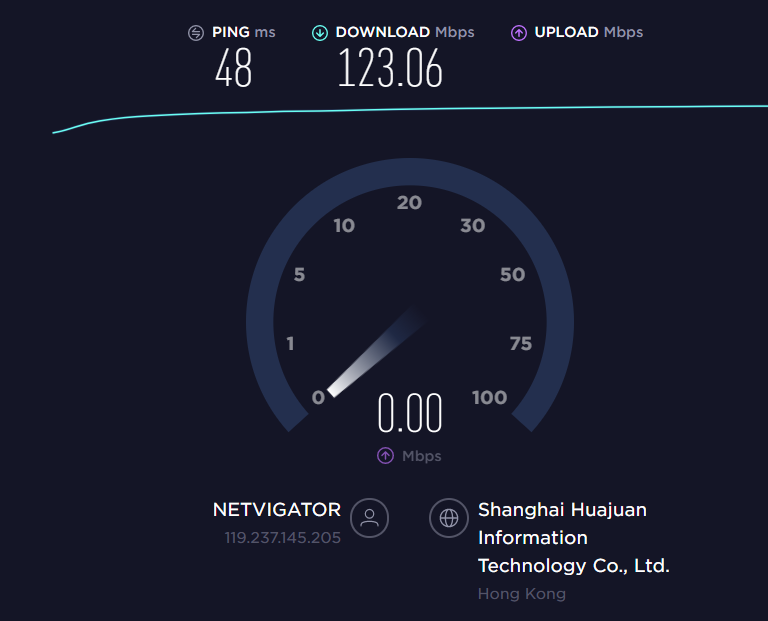
本地电信300M
批注 2019-12-26 235231.png
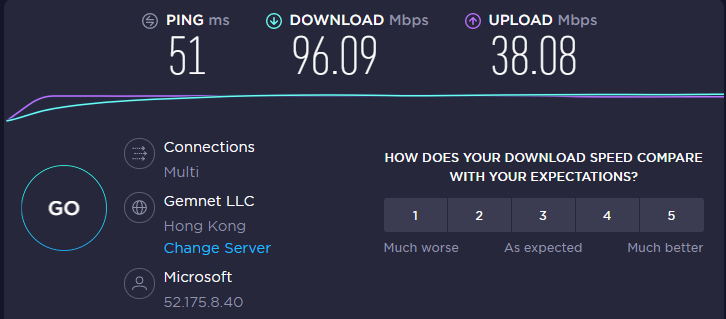
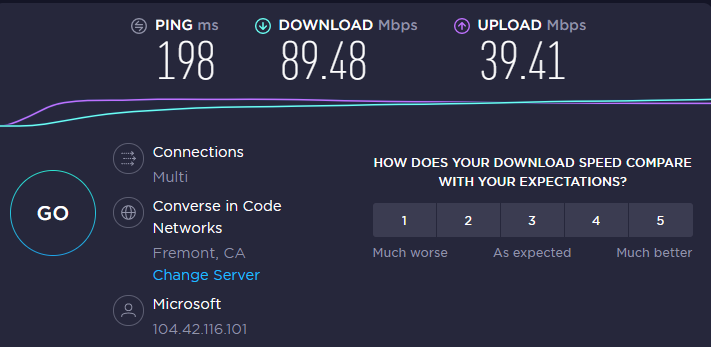
香港微软
批注 2019-12-19 124014.png
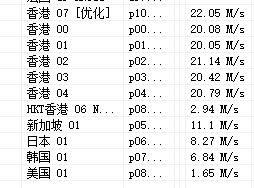
香港hkt Netflix支持
批注 2019-12-19 124846.png
美国微软
批注 2019-12-19 125727.png
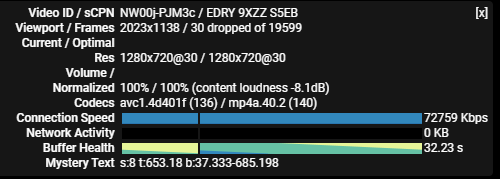
YouTube
批注 2019-12-19 132303.png

注意:测速结果只反映当时速度,实际速度以自己使用为准

价格

1元试用套餐了,可以试用满意再购买
1.年付128GB每月 360天 88元
2.年付256GB每月 360天 128元
3.年付512GB每月 360天 198元
4.年付1T每月 360天 288元
支持支付宝充值
按自己使用量购买 感觉他家流量跑得多
温馨提示:所有机场都有跑路风险,按需上车
注册链接:https://pud.life/aff/2MfZ

节点地区

香港Netflix 日本Netflix 新加坡 韩国 美国
支持订阅的客户端:V2ray Clash Quantumult Quantumult X Surge

说明:
使用环境
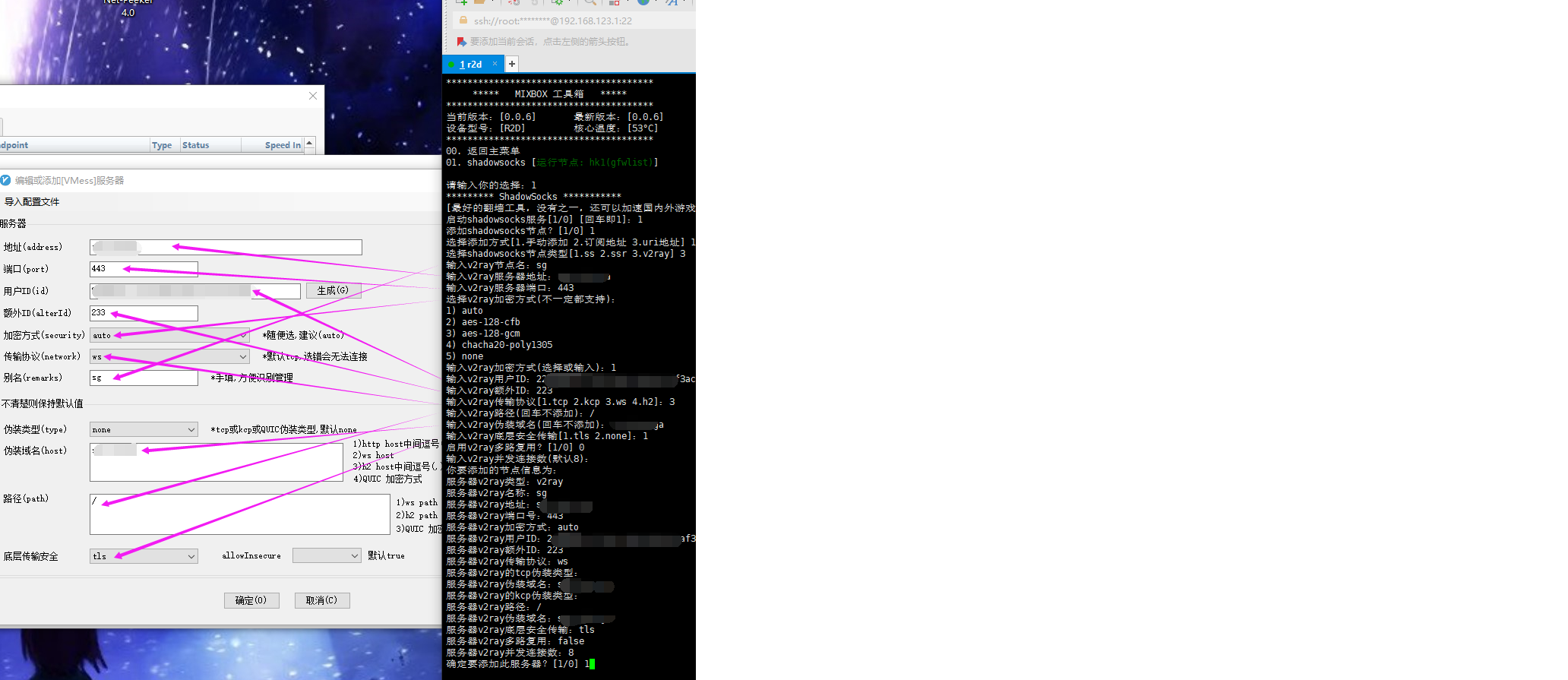
小米路由器r2d
工具箱mixbox ssh安装地址:sh -c "$(curl -kfsSl https://dev.tencent.com/u/monlor/p/MIXBOX/git/raw/master/install.sh)" && source /etc/profile &> /dev/null

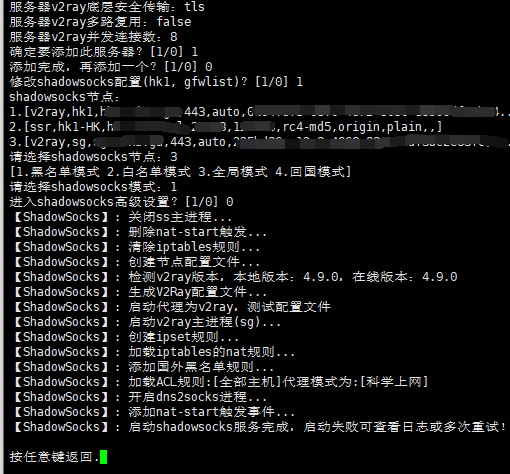
v2ray设置

不支持订阅
不支持导入
手动添加节点
mixbox-v2ray.png

照着电脑上的客户端粘贴进去
v2ray.png

模式只能使用黑名单
愉快的玩耍吧

单选题

下列关于装维随销说法不正确的是( )
A.装维随销的基础是优质服务
B.智能宽带营销的关键在于算账比价
C.体验式营销是智能宽带的主要营销方式
D.主要通过上门机会开展营销活动
正确答案 : B

关于魔方APP的智能场景设置,下列哪些项目不可作为触发条件( )
A.温度
B.万能遥控器
C.语音控制
D.定时
正确答案 : B

多选题

关于魔方APP的智能场景设置,下列哪些项目可作为联动触发条件( )
A.房间
B.设备
C.语音控制
D.定时
正确答案 : BCD

智能宽带对我们来说就是给客户智慧家庭一揽子的解决方案,他包含了( )
A.智能网络
B.智能平台
C.智能设备
D.智能应用
正确答案 : ACD

下列哪些设备可满足200Mbps无线速率的组网需求( )
A.E8820
B.E8810
C.TL-AP302I-POE
D.AC-9
E.WS831
F.WS5200
G.R3G
H.WR886N
正确答案 : ADF

智能宽带包含的三大要素是( )
A.智能网络
B.智能终端
C.智能应用
D.智能家居
正确答案 : ABC

智能家居设备的常见网络接入方式主要包含哪些( )
A.WIFI
B.Zigbee
C.蓝牙
D.NB-IoT
正确答案 : ABCD

判断题

i视视中的魔方APP具备智能设备配网的功能,可实现对NV5001配网。
正确答案 : 错

说明:Debian 9默认的就是4.9的内核而且编译了TCP BBR的内容,所以可以直接通过参数开启

1、修改系统变量
echo "net.core.default_qdisc=fq" >> /etc/sysctl.conf
echo "net.ipv4.tcp_congestion_control=bbr" >> /etc/sysctl.conf

2、保存生效
sysctl -p

3、查看内核是否已开启BBR
sysctl net.ipv4.tcp_available_congestion_control

显示以下即已开启:
# sysctl net.ipv4.tcp_available_congestion_control
net.ipv4.tcp_available_congestion_control = bbr cubic reno

4、查看BBR是否启动
lsmod | grep bbr

显示以下即启动成功:
# lsmod | grep bbr
tcp_bbr                20480  xx

参考:https://www.moerats.com/archives/297/