标签 路由器 下的文章

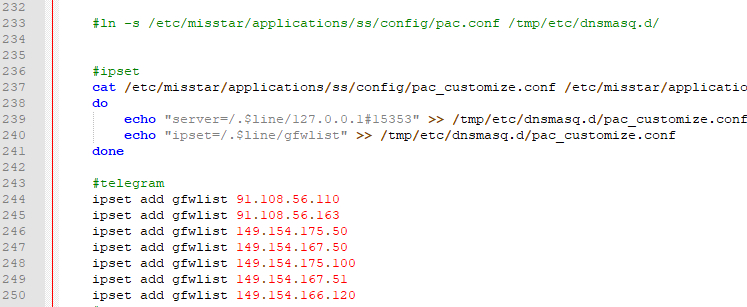
1.小米路由器r2d中 使用 mt工具箱3.0 的gfwlist模式,telegram不能直接连接。

2.当前通过netpeeker软件看到的IP如下:

ipset add gfwlist 91.108.56.110
ipset add gfwlist 91.108.56.163
ipset add gfwlist 149.154.175.50
ipset add gfwlist 149.154.167.50
ipset add gfwlist 149.154.175.100
ipset add gfwlist 149.154.167.51
ipset add gfwlist 149.154.166.120

3.修改工具箱中ss脚本
vi /etc/misstar/applications/ss/script/ss
添加到start函数末尾

start()
{
#此处为添加的内容
/etc/init.d/dnsmasq restart
}

4.给权限
chmod +x /etc/misstar/applications/ss/script/ss

image

参考:
https://laoyur.com/archives/267
https://gist.github.com/lanceliao/3099caed8750911dfe58

菜鸟一枚,根据自己操作写的记录贴,有不当的地方请指出

下载v2ray

下载地址:https://github.com/v2ray/v2ray-core/releases/
r2d选择arm:https://github.com/v2ray/v2ray-core/releases/download/v3.43/v2ray-linux-arm.zip

上传至路由器

目录:根据自己实际情况,之前又mt工具箱,所以直接放里面了
/data/etc/misstar/applications/v2ray
1.解压上传客户端文件

2.上传客户端配置文件
2.1导出客户端配置并上传至路由器
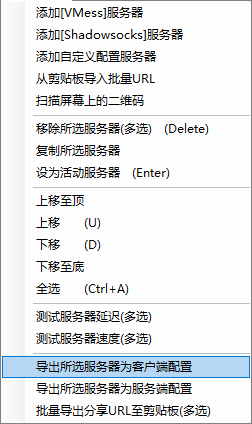
image

2.2修改配置文件,参考下面代码

{
  "log": {
    "access": "",
    "error": "error.log", 
    "loglevel": "warning"
  },
  "inbound": {
    "port": 2333,
    "listen": "0.0.0.0",
    "protocol": "socks",
    "domainOverride": [
      "tls",
      "http"
    ],
    "settings": {
      "auth": "noauth",
      "udp": true,
      "ip": "127.0.0.1",
      "clients": null
    },
    "streamSettings": null
  },
  "outbound": {
    "tag": "agentout",
    "protocol": "vmess",
    "settings": {
      "vnext": [
        {
          "address": "us2.sangyu.tw",
          "port": 443,
          "users": [
            {
              "id": "xxxxxxxxxxxxxxxxxxx",
              "alterId": 233,
              "email": "t@t.tt",
              "security": "aes-128-gcm"
            }
          ]
        }
      ],
      "servers": null
    },
    "streamSettings": {
      "network": "ws",
      "security": "tls",
      "tlsSettings": {
        "allowInsecure": true,
        "serverName": null
      },
      "tcpSettings": null,
      "kcpSettings": null,
      "wsSettings": {
        "connectionReuse": true,
        "path": "/",
        "headers": {
          "Host": "us2.sangyu.tw"
        }
      },
      "httpSettings": null
    },
    "mux": {
      "enabled": true
    }
  },
    "inboundDetour":[
        {
           "protocol":"dokodemo-door",
           "port":1099, 
           "settings":{
              "address":"",
              "network":"tcp",
              "timeout":0,
              "followRedirect":true
           }
        }
     ],
  "outboundDetour": [
    {
      "protocol": "freedom",
      "settings": {
        "response": null
      },
      "tag": "direct"
    },
    {
      "protocol": "blackhole",
      "settings": {
        "response": {
          "type": "http"
        }
      },
      "tag": "blockout"
    }
  ],
  "dns": {
    "servers": [
      "8.8.8.8",
      "8.8.4.4",
      "localhost"
    ]
  },
  "routing": {
    "strategy": "rules",
    "settings": {
      "domainStrategy": "IPIfNonMatch",
      "rules": [
        {
          "type": "field",
          "port": null,
          "outboundTag": "direct",
          "ip": null,
          "domain": [
            "geosite:cn"
          ]
        },
        {
          "type": "field",
          "port": null,
          "outboundTag": "direct",
          "ip": [
            "geoip:cn"
          ],
          "domain": null
        },
        {
          "type": "field",
          "port": null,
          "outboundTag": "direct",
          "ip": [
            "0.0.0.0/8",
            "10.0.0.0/8",
            "100.64.0.0/10",
            "127.0.0.0/8",
            "169.254.0.0/16",
            "172.16.0.0/12",
            "192.0.0.0/24",
            "192.0.2.0/24",
            "192.168.0.0/16",
            "198.18.0.0/15",
            "198.51.100.0/24",
            "203.0.113.0/24",
            "::1/128",
            "fc00::/7",
            "fe80::/10"
          ],
          "domain": null
        }
      ]
    }
  }
}

运行软件

1.切换到目录下:/data/etc/misstar/applications/v2ray
2.赋予权限:

chmod +x /data/etc/misstar/applications/v2ray/v2ray
chmod +x /data/etc/misstar/applications/v2ray/v2ctl

3../v2ray --config=/data/etc/misstar/applications/v2ray/config.json
后台运行nohup /data/etc/misstar/applications/v2ray/v2ray --config=/data/etc/misstar/applications/v2ray/config.json &

参考:
https://ralf.ren/717
https://cloverkit.coding.me/2018/08/07/配置-V2Ray-和路由器透明代理
基本介绍

路由器:r2d
工具箱:Misstar Tools 版本:3.18.09.10
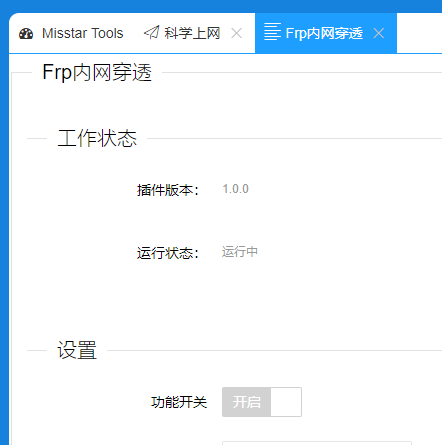
插件:frp
故障描述:frp无法正常启动,本人菜鸟,无法获取更多的错误信息,工具箱群里问了下没人回,还好搜索有解决办法,就搬过来了。

更新路由器中的frp

1.下载最新版frp:https://github.com/fatedier/frp/releases
当前的最新版下载地址:https://github.com/fatedier/frp/releases/download/v0.21.0/frp_0.21.0_linux_arm.tar.gz

2.解压下载的文件,替换/data/etc/misstar/applications/frp/bin中的frpc

3.更改frp配置信息
vi /data/etc/misstar/applications/frp/script/frp #编辑配置文件
修改第32行echo "privilege_token = "$privilege_token >> /etc/misstar/applications/frp/config/frpc.confecho "token = "$privilege_token >> /etc/misstar/applications/frp/config/frpc.conf
在下一行增加两行frpc运行时生成日志,方便出问题时的排查:

    echo >> /etc/misstar/applications/frp/config/frpc.conf
    echo "log_file = /etc/misstar/applications/frp/bin/frpc.log" >> /etc/misstar/applications/frp/config/frpc.conf

文件最后加上restart 的脚本

restart(){
        stop; sleep 2; start
}

赋予执行权限:chmod +x /data/etc/misstar/applications/frp/script/frp
[工具箱配置完成后]试一下看能不能启动 frpc:./frp start

更新服务端frp

./install-frps.sh update
我当时路由器用最新版 而vps用0.16.0的时候就会出现这样的错误login to server failed: EOF

image

参考:http://bbs.xiaomi.cn/t-32690007

r2d的当前版本2.25.201,发现mt工具箱打开失效了,显示:

No page is registered at '/web/misstar/index' .

If this url belongs to an extension, make sure it is properly installed.

If the extension was recently installed, try removing the /tmp/luci-indexcache file.

查找有现成的方法,就搬过来了
1、ssh方root用户登录路由器后台;
2、执行命令:
vi /usr/lib/lua/luci/controller/web/index2.lua
3、加入如下内容:

module("luci.controller.web.index2", package.seeall) 
function index()      
     local page   = node("web","misstar")          
     page.target  = firstchild()         
     page.title   = ("")          
     page.order   = 100          
     page.sysauth = "admin"          
     page.sysauth_authenticator = "jsonauth"          
     page.index = true          
     entry({"web", "misstar", "index"}, template("web/setting/misstar/index"), _("Tools"), 81)          
     entry({"web", "misstar", "add"}, template("web/setting/misstar/add"), _("Tools"), 82)          
     entry({"web", "misstar"}, alias("web","misstar","index"), _("Tools"), 80)          
     entry({"web", "misstar", "ss"}, template("web/setting/applications/ss/html/ss"), _("Tools"), 85)          
     entry({"web", "misstar","frp"}, template("web/setting/applications/frp/html/frp"), _("Tools"), 85)          
     entry({"web", "misstar","aliddns"}, template("web/setting/applications/aliddns/html/aliddns"), _("Tools"), 85)  
     entry({"web", "misstar","adm"}, template("web/setting/applications/adm/html/adm"), _("Tools"), 85)    
     entry({"web", "misstar","koolproxy"}, template("web/setting/applications/koolproxy/html/koolproxy"), _("Tools"), 85)
     entry({"web", "misstar","rm"}, template("web/setting/applications/rm/html/rm"), _("Tools"), 85)
     entry({"web", "misstar","aria2"}, template("web/setting/applications/aria2/html/aria2"), _("Tools"), 85) 
     entry({"web", "misstar","webshell"}, template("web/setting/applications/webshell/html/webshell"), _("Tools"), 85)
     entry({"web", "misstar","pptpd"}, template("web/setting/applications/pptpd/html/pptpd"), _("Tools"), 85)  
     entry({"web", "misstar","ftp"}, template("web/setting/applications/ftp/html/ftp"), _("Tools"), 85)
     entry({"web", "misstar","kms"}, template("web/setting/applications/kms/html/kms"), _("Tools"), 85)  
end

4、执行清理缓存命令:
rm -rf /tmp/luci-indexcache

参考:http://www.cmliu.net/?id=78

简介

k2 A2版升级到了最新22.6.507.43固件
连接路由器需要lan口连接电脑

刷机前准备

RoutAckProV1B2.rar //一键刷Telnet
K2_V22.6.506.28.bin //能Telnet的低版本固件
PSG1218-K2_3.4.3.9-099_20170911-0050.trx //荒野无灯版老毛子
路由器刷breed+Web控制台助手v4.8版本.7z //刷breed/固件
备用下载:链接: https://pan.baidu.com/s/16aFgXh-6kiGBYU119uQWXA 密码: j867

降级固件

手动升级,选择K2_V22.6.506.28.bin,等待升级完成

打开Telnet

使用软件RoutAckProV1B2.exe,输入路由器的IP,打开Telnet

刷breed

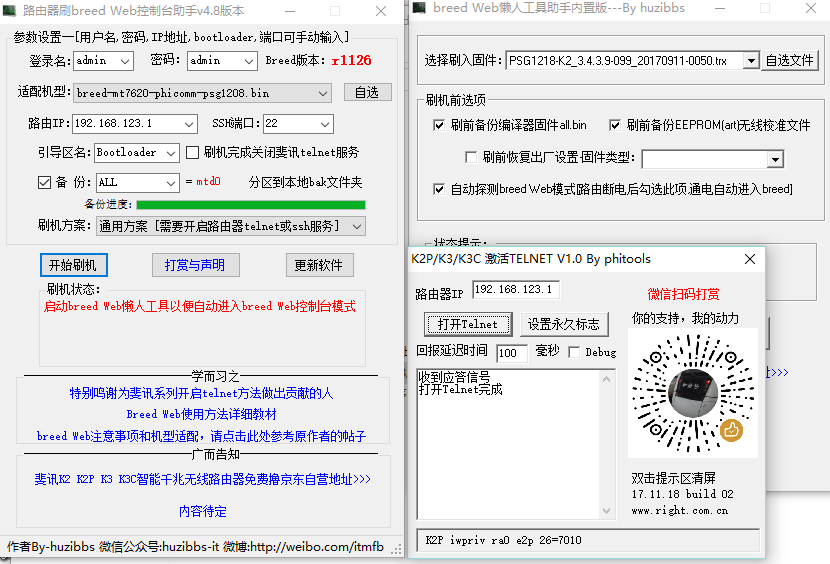
右键管理员方式运行 路由器刷breed Web控制台助手v4.8版本.exe,输入路由器IP,点击开始刷机。成功有提示。

刷固件

打开breed Web懒人工具.exe(上一步成功后选择打开了的省略此步),勾选“自动探测breed web模式”,重启路由器,工具提示选择固件,自选文件PSG1218-K2_3.4.3.9-099_20170911-0050.trx后点击开始刷机。

image

参考文章

小米路由器 mini 刷機
小米路由器mini 免USB打開SSH
小米路由器 mini 刷 Padavan 详细教程

准备工作

硬件:电脑,路由器
软件:winscp(Google drive),Xshell 5
固件相关:小米路由器mini穩定版2.8.14(Google drive),不死bread(Google drive),padavan固件(Google drive
度盘链接: https://pan.baidu.com/s/1eT9SxDg 密码: muj1

无U盘开启ssh

因为身边没有U盘可用,所以只能这样来开启ssh,有U盘的直接按照官方开启即可
1.正常使用的路由器刷入稳定版2.8.14,系统升级=>选择固件升级
2.登入 小米路由器mini控制台 後複制網址
http://192.168.31.1/cgi-bin/luci/;stok=521b849e00a11c5b6743aa275ba84ed8/web/home#router
3.將下面的網址/api前面的部份換成自己的,然後再貼到Browser上
http://192.168.31.1/cgi-bin/luci/;stok=521b849e00a11c5b6743aa275ba84ed8/api/xqsystem/set_name_password?oldPwd=路由器控制台管理密碼&newPwd=admin
等待10s左右,顺利的會得到 {"code":0}
4.將下面的網址/api前面的部份換成自己的,然後再貼到Browser上
http://192.168.31.1/cgi-bin/luci/;stok=521b849e00a11c5b6743aa275ba84ed8/api/xqnetwork/set_wifi_ap?ssid=tianbao&encryption=NONE&enctype=NONE&channel=1%3B%2Fusr%2Fsbin%2Ftelnetd
等待30s左右,順利的會得到 {"msg":"未能連接到指定WiFi(Probe timeout)","code":1616}
5.打开运行(win+r),输入telnet 192.168.31.1去連,帳號︰root,密碼︰admin,連上後依序輸入下面的command,每行一条命令

sed -i ":x;N;s/if \[.*\; then\n.*return 0\n.*fi/#tb/;b x" /etc/init.d/dropbear
/etc/init.d/dropbear start
nvram set ssh_en=1; nvram commit

备份

1.用putty(xshell也行)命令備份小米uboot,用 帳號:root 密碼:admin 登陆,执行命令:
dd if=/dev/mtd1 of=/tmp/xiaomi_uboot.bin這個是備份小米uboot,以後刷回miwifi需要)
取出備份需要用winscp.注意:用WinSCP連線時,檔案協定要選SCP,在tmp根目录下找到xiaomi_uboot.bin文件下载到电脑上备份。
2.查看 rom:cat /proc/mtd

root@XiaoQiang:~# cat /proc/mtd
dev:    size   erasesize  name
mtd0: 01000000 00010000 "ALL"
mtd1: 00030000 00010000 "Bootloader"
mtd2: 00010000 00010000 "Config"
mtd3: 00010000 00010000 "Factory"
mtd4: 00c80000 00010000 "OS1"
mtd5: 00b11e68 00010000 "rootfs"
mtd6: 00200000 00010000 "OS2"
mtd7: 00100000 00010000 "overlay"
mtd8: 00010000 00010000 "crash"
mtd9: 00010000 00010000 "reserved"
mtd10: 00010000 00010000 "Bdata"

备份rom:以下命令每行一条的来

cd /tmp
mkdir rom
dd if=/dev/mtd0 of=/tmp/rom/ALL.bin
dd if=/dev/mtd1 of=/tmp/rom/Bootloader.bin
dd if=/dev/mtd2 of=/tmp/rom/Config.bin
dd if=/dev/mtd3 of=/tmp/rom/Factory.bin
dd if=/dev/mtd4 of=/tmp/rom/OS1.bin
dd if=/dev/mtd5 of=/tmp/rom/rootfs.bin
dd if=/dev/mtd6 of=/tmp/rom/OS2.bin
dd if=/dev/mtd7 of=/tmp/rom/overlay.bin
dd if=/dev/mtd8 of=/tmp/rom/crash.bin
dd if=/dev/mtd9 of=/tmp/rom/reserved.bin
dd if=/dev/mtd10 of=/tmp/rom/Bdata.bin

用 WinSCP 登陆路由器后台(IP 为 192.168.31.1 ,用户名密码同上一步保存的),将备份到 /tmp/rom 中的这些 bin 文件拷贝到电脑作为备份

恢复命令 (以后备用)

mtd write /tmp/rom/Bootloader.bin Bootloader
mtd write /tmp/rom/Config.bin Config
mtd write /tmp/rom/Factory.bin Factory
mtd write /tmp/rom/OS1.bin OS1
mtd write /tmp/rom/rootfs.bin rootfs
mtd write /tmp/rom/OS2.bin OS2
mtd write /tmp/rom/overlay.bin overlay
mtd write /tmp/rom/crash.bin crash
mtd write /tmp/rom/reserved.bin reserved
mtd write /tmp/rom/Bdata.bin Bdata

刷入不死breed

把breed-mt7620-xiaomi-mini.bin用WinSCP传到/tmp目录,PuTTY连上路由器并切换目录至/tmp刷入:

cd /tmp
mtd -r write breed-mt7620-xiaomi-mini.bin Bootloader

刷入后,机器会重新启动,指示灯变蓝,这时需要确保电脑设置为自动获取 IP 地址,并且是用网线连上的路由器。
最后打开 CMD,运行 ping 192.168.1.1 -t(这时是 ping 不通的),按如下流程:
1,断开小米路由器的电源,用牙签等尖锐物按下路由器 reset 按钮后重新接入电源;
2,等到 mini 路由器的灯开始闪烁或 ping 通时即表明进入 Web 刷机模式,松开 reset 键。
这时在电脑上输入 192.168.1.1,就进入不死 Breed 的控制台了。

刷入固件

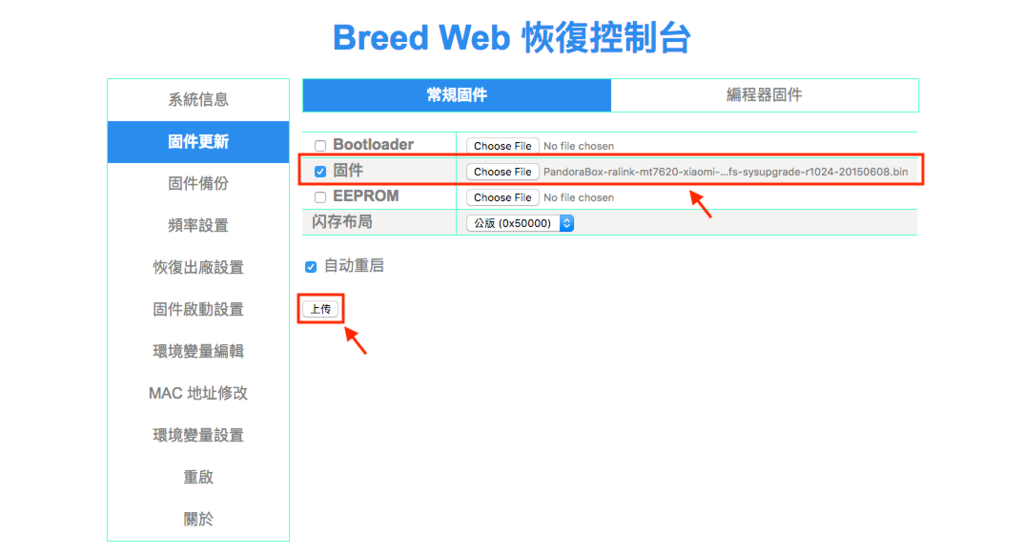
在 Breed Web 控制台依次选择:固件更新 -> 常规固件 -> 勾选固件复选框 -> 浏览,选择上一步下载好的 Padavan 固件上传,刷入搞定!
breed

伪静态作用

美观,seo需要

修改步骤

打开 userdisk/llmp/etc/lighttpd/lighttpd.conf 文件
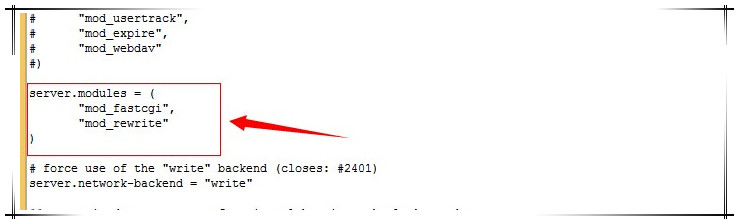
1."mod_fastcgi",的下一行添加"mod_rewrite"
lighttpd
2.增加以下代码

url.rewrite-if-not-file = (
"^/(admin|usr)/(.*)" => "/$1/$2",
"^/(.*)$" => "/index.php/$1"
)

3.重启lighttpd服务,kill pid 或者 重启路由器
方法1.ssh到192.168.31.1:3333 root用户,执行:ps | grep lighttpd
看到那个数字了么这个就是lighttpd的进程PID,下面命令中 字母PID 更换为你的那个数字
Kill PID
kill pid
方法2.重启路由器

注意

修改后,出现网站打不开的情况,用命令ps | grep lighttpd查看是否有/usr/sbin/lighttpd -f /etc/lighttpd/lighttpd.conf进程。如果没有,恢复原文件,重启路由器即可

参考资料:
1.教你在小米路由上也玩一把wordpress伪静态
2.lighttpd下关于typecho的3种伪静态规则,亲测可用