标签 install 下的文章

执行lsblk命令查看能否正常识别mmcblk1分区,若不能识别则无法刷入emmc

install.sh文件代码如下

#!/bin/sh
 
echo "Start script create MBR and filesystem"
 
DEV_EMMC=/dev/mmcblk1
 
echo "Start backup u-boot default"
 
dd if="${DEV_EMMC}" of=/boot/u-boot-default.img bs=1M count=4
 
echo "Start create MBR and partittion"
 
parted -s "${DEV_EMMC}" mklabel msdos
# `bootloader` / `reserved` occupies [0, 100M).
# Sector size is 512B.
parted -s "${DEV_EMMC}" unit s mkpart primary fat32 204800 466943  # [100M, 228M)
parted -s "${DEV_EMMC}" unit s mkpart primary ext4 466944 100%     # [228M, ...]
 
echo "Start restore u-boot"
 
dd if=/boot/u-boot-default.img of="${DEV_EMMC}" conv=fsync bs=1 count=442
dd if=/boot/u-boot-default.img of="${DEV_EMMC}" conv=fsync bs=512 skip=1 seek=1
 
sync
 
echo "Done"
 
echo "Start copy system for eMMC."
 
mkdir -p /ddbr
chmod 777 /ddbr
 
PART_BOOT="/dev/mmcblk1p1"
PART_ROOT="/dev/mmcblk1p2"
DIR_INSTALL="/ddbr/install"
 
if [ -d $DIR_INSTALL ] ; then
    rm -rf $DIR_INSTALL
fi
mkdir -p $DIR_INSTALL
 
if grep -q $PART_BOOT /proc/mounts ; then
    echo "Unmounting BOOT partiton."
    umount -f $PART_BOOT
fi
echo -n "Formatting BOOT partition..."
mkfs.vfat -n "BOOT_EMMC" $PART_BOOT
echo "done."
 
mount -o rw $PART_BOOT $DIR_INSTALL
 
echo -n "Cppying BOOT..."
cp -r /boot/* $DIR_INSTALL && sync
echo "done."
 
echo -n "Edit init config..."
sed -e "s/ROOTFS/ROOT_EMMC/g" \
 -i "$DIR_INSTALL/uEnv.ini"
echo "done."
 
rm $DIR_INSTALL/s9*
rm $DIR_INSTALL/aml*
rm -rf $DIR_INSTALL/n1*
 
umount $DIR_INSTALL
 
if grep -q $PART_ROOT /proc/mounts ; then
    echo "Unmounting ROOT partiton."
    umount -f $PART_ROOT
fi
 
if [ -e /boot/n1-logo.img ] ; then
# The logo should be no greater than 8M. (It's less than 5M in my case.)
echo "Installing Ubuntu logo..."
dd if=/boot/n1-logo.img of=/dev/mmcblk1 bs=1M seek=644
echo "done."
fi
 
echo "Formatting ROOT partition..."
# 0x27400000 ~ +0x800000 is used by `/dev/env`. Mark them as bad blocks
# so that they won't be used by Linux. (It seems that they're overwritten
# each time system boots if invalid.)
#
# As `ROOT_EMMC` starts from 228M, offset of `/dev/env` in this partition
# is 400M.
#
# Here we generates a sequence of block number in range [400M, 408M), with
# block size = 4K, and pass them as bad blocks to `mke2fs`.
#
# Given that we're using 4K blocks, the mapped block number will be [102400,
# 104448), or [102400, 104447].
#
# `/dev/logo` is in range [644M, 772M) (of the whole `/dev/mmcblk1`, not this
# partition. Minus 228M yourself.). Mark them as bad blocks if you want to
# preserve or replace the boot logo.
#
# All other partitions (`recovery`, `rsv`, `tee`, `crypt`, `misc`, `boot`,
# `system`, `data` is already overwritten by the original script, as it
# places the first partition at 700M.)
echo "Marked blocks used by /dev/env as bad to protected them from being overwritten."
seq 102400 104447 > /tmp/reservedblks
if [ -e /boot/n1-logo.img ] ; then
echo "Marked blocks used by /dev/logo as bad."
seq 106496 108543 >> /tmp/reservedblks  # Only first 8M of `/dev/logo` is reserved.
fi
mke2fs -F -q -t ext4 -L ROOT_EMMC -m 0 $PART_ROOT -b 4096 -l /tmp/reservedblks
e2fsck -n $PART_ROOT
echo "done."
 
echo "Copying ROOTFS."
 
mount -o rw $PART_ROOT $DIR_INSTALL
 
cd /
echo "Copy BIN"
tar -cf - bin | (cd $DIR_INSTALL; tar -xpf -)
#echo "Copy BOOT"
#mkdir -p $DIR_INSTALL/boot
#tar -cf - boot | (cd $DIR_INSTALL; tar -xpf -)
echo "Create DEV"
mkdir -p $DIR_INSTALL/dev
#tar -cf - dev | (cd $DIR_INSTALL; tar -xpf -)
echo "Copy ETC"
tar -cf - etc | (cd $DIR_INSTALL; tar -xpf -)
echo "Copy HOME"
tar -cf - home | (cd $DIR_INSTALL; tar -xpf -)
echo "Copy LIB"
tar -cf - lib | (cd $DIR_INSTALL; tar -xpf -)
echo "Create MEDIA"
mkdir -p $DIR_INSTALL/media
#tar -cf - media | (cd $DIR_INSTALL; tar -xpf -)
echo "Create MNT"
mkdir -p $DIR_INSTALL/mnt
#tar -cf - mnt | (cd $DIR_INSTALL; tar -xpf -)
echo "Copy OPT"
tar -cf - opt | (cd $DIR_INSTALL; tar -xpf -)
echo "Create PROC"
mkdir -p $DIR_INSTALL/proc
echo "Copy ROOT"
tar -cf - root | (cd $DIR_INSTALL; tar -xpf -)
echo "Create RUN"
mkdir -p $DIR_INSTALL/run
echo "Copy SBIN"
tar -cf - sbin | (cd $DIR_INSTALL; tar -xpf -)
echo "Copy SELINUX"
tar -cf - selinux | (cd $DIR_INSTALL; tar -xpf -)
echo "Copy SRV"
tar -cf - srv | (cd $DIR_INSTALL; tar -xpf -)
echo "Create SYS"
mkdir -p $DIR_INSTALL/sys
echo "Create TMP"
mkdir -p $DIR_INSTALL/tmp
echo "Copy USR"
tar -cf - usr | (cd $DIR_INSTALL; tar -xpf -)
echo "Copy VAR"
tar -cf - var | (cd $DIR_INSTALL; tar -xpf -)
 
echo "Copy fstab"
 
rm $DIR_INSTALL/etc/fstab
cp -a /root/fstab $DIR_INSTALL/etc/fstab
 
rm $DIR_INSTALL/root/install.sh
rm $DIR_INSTALL/root/fstab
rm $DIR_INSTALL/usr/bin/ddbr
rm $DIR_INSTALL/usr/bin/ddbr_backup_nand
rm $DIR_INSTALL/usr/bin/ddbr_backup_nand_full
rm $DIR_INSTALL/usr/bin/ddbr_restore_nand
 
 
cd /
sync
 
umount $DIR_INSTALL
 
echo "*******************************************"
echo "Complete copy OS to eMMC "
echo "*******************************************"

执行shutdown now关机断电,拔掉u盘后插电即可直接进入armbian

参考:
https://www.leonlu.cc/hobby/note005-phicomm-p1-linux/
https://isolated.site/2018/12/08/my-script-for-installing-armbian-5-67-into-phicomm-n1/
说明:下午一大佬说韩国能开出机子了,马上试了下,果然一点就开到了。尴尬的是,添加SSH密钥我选择的文件,但开出来后并不能登录上,记得上次也是这样,是删了重新开的,最近如果重新开的话,资源紧张,应该开不出来了,就搜了下,结果还是成功修改了。

Oracle修改公钥步骤

把系统盘挂载到账户里另一台小鸡中,编辑了公钥后再还原回去就行了。具体步骤参看:

Oracle VPS主机更换IP,重装系统,手动上传公钥,安装加速模块以及避免收费方法
https://wzfou.com/oracle-ip-root/#ftoc-heading-6

Oracle Cloud更换IP以及生成/重置SSH密钥(亲测可行)
https://51.ruyo.net/14288.html#4

遇到的坑

1.报错 -bash: iscsiadm: command not found
apt-get install open-iscsi
2.挂载 路径为fdisk -l命令看到的46g左右的那个
3.挂载命令:mount /dev/sdb1 /mnt
mount -o nouuid /dev/sdb3 /mnt 这个命令会报错

mount: wrong fs type, bad option, bad superblock on /dev/sdb1,
       missing codepage or helper program, or other error

       In some cases useful info is found in syslog - try
       dmesg | tail or so.

dd Debian系统

bash <(wget --no-check-certificate -qO- 'https://moeclub.org/attachment/LinuxShell/InstallNET.sh') -d 9 -v 64 -p 'password' -a -firmware
自行修改password

#!/bin/bash
 
#write by zhumaohai(admin#centos.bz)
#author blog: www.centos.bz
 
 
#显示菜单(单选)
display_menu(){
local soft=$1
local prompt="which ${soft} you'd select: "
eval local arr=(\${${soft}_arr[@]})
while true
do
    echo -e "#################### ${soft} setting ####################\n\n"
    for ((i=1;i<=${#arr[@]};i++ )); do echo -e "$i) ${arr[$i-1]}"; done
    echo
    read -p "${prompt}" $soft
    eval local select=\$$soft
    if [ "$select" == "" ] || [ "${arr[$soft-1]}" == ""  ];then
        prompt="input errors,please input a number: "
    else
        eval $soft=${arr[$soft-1]}
        eval echo "your selection: \$$soft"             
        break
    fi
done
}
 
#把带宽bit单位转换为人类可读单位
bit_to_human_readable(){
    #input bit value
    local trafficValue=$1
 
    if [[ ${trafficValue%.*} -gt 922 ]];then
        #conv to Kb
        trafficValue=`awk -v value=$trafficValue 'BEGIN{printf "%0.1f",value/1024}'`
        if [[ ${trafficValue%.*} -gt 922 ]];then
            #conv to Mb
            trafficValue=`awk -v value=$trafficValue 'BEGIN{printf "%0.1f",value/1024}'`
            echo "${trafficValue}Mb"
        else
            echo "${trafficValue}Kb"
        fi
    else
        echo "${trafficValue}b"
    fi
}
 
#判断包管理工具
check_package_manager(){
    local manager=$1
    local systemPackage=''
    if cat /etc/issue | grep -q -E -i "ubuntu|debian";then
        systemPackage='apt'
    elif cat /etc/issue | grep -q -E -i "centos|red hat|redhat";then
        systemPackage='yum'
    elif cat /proc/version | grep -q -E -i "ubuntu|debian";then
        systemPackage='apt'
    elif cat /proc/version | grep -q -E -i "centos|red hat|redhat";then
        systemPackage='yum'
    else
        echo "unkonw"
    fi
 
    if [ "$manager" == "$systemPackage" ];then
        return 0
    else
        return 1
    fi   
}
 
 
#实时流量
realTimeTraffic(){
    local eth=""
    local nic_arr=(`ifconfig | grep -E -o "^[a-z0-9]+" | grep -v "lo" | uniq`)
    local nicLen=${#nic_arr[@]}
    if [[ $nicLen -eq 0 ]]; then
        echo "sorry,I can not detect any network device,please report this issue to author."
        exit 1
    elif [[ $nicLen -eq 1 ]]; then
        eth=$nic_arr
    else
        display_menu nic
        eth=$nic
    fi   
 
    local clear=true
    local eth_in_peak=0
    local eth_out_peak=0
    local eth_in=0
    local eth_out=0
 
    while true;do
        #移动光标到0:0位置
        printf "\033[0;0H"
        #清屏并打印Now Peak
        [[ $clear == true ]] && printf "\033[2J" && echo "$eth--------Now--------Peak-----------"
        traffic_be=(`awk -v eth=$eth -F'[: ]+' '{if ($0 ~eth){print $3,$11}}' /proc/net/dev`)
        sleep 2
        traffic_af=(`awk -v eth=$eth -F'[: ]+' '{if ($0 ~eth){print $3,$11}}' /proc/net/dev`)
        #计算速率
        eth_in=$(( (${traffic_af[0]}-${traffic_be[0]})*8/2 ))
        eth_out=$(( (${traffic_af[1]}-${traffic_be[1]})*8/2 ))
        #计算流量峰值
        [[ $eth_in -gt $eth_in_peak ]] && eth_in_peak=$eth_in
        [[ $eth_out -gt $eth_out_peak ]] && eth_out_peak=$eth_out
        #移动光标到2:1
        printf "\033[2;1H"
        #清除当前行
        printf "\033[K"   
        printf "%-20s %-20s\n" "Receive:  $(bit_to_human_readable $eth_in)" "$(bit_to_human_readable $eth_in_peak)"
        #清除当前行
        printf "\033[K"
        printf "%-20s %-20s\n" "Transmit: $(bit_to_human_readable $eth_out)" "$(bit_to_human_readable $eth_out_peak)"
        [[ $clear == true ]] && clear=false
    done
}
 
#流量和连接概览
trafficAndConnectionOverview(){
    if ! which tcpdump > /dev/null;then
        echo "tcpdump not found,going to install it."
        if check_package_manager apt;then
            apt-get -y install tcpdump
        elif check_package_manager yum;then
            yum -y install tcpdump
        fi
    fi
 
    local reg=""
    local eth=""
    local nic_arr=(`ifconfig | grep -E -o "^[a-z0-9]+" | grep -v "lo" | uniq`)
    local nicLen=${#nic_arr[@]}
    if [[ $nicLen -eq 0 ]]; then
        echo "sorry,I can not detect any network device,please report this issue to author."
        exit 1
    elif [[ $nicLen -eq 1 ]]; then
        eth=$nic_arr
    else
        display_menu nic
        eth=$nic
    fi
 
    echo "please wait for 10s to generate network data..."
    echo
    #当前流量值
    local traffic_be=(`awk -v eth=$eth -F'[: ]+' '{if ($0 ~eth){print $3,$11}}' /proc/net/dev`)
    #tcpdump监听网络
    tcpdump -v -i $eth -tnn > /tmp/tcpdump_temp 2>&1 &
    sleep 10
    clear
    kill `ps aux | grep tcpdump | grep -v grep | awk '{print $2}'`
 
    #10s后流量值
    local traffic_af=(`awk -v eth=$eth -F'[: ]+' '{if ($0 ~eth){print $3,$11}}' /proc/net/dev`)
    #打印10s平均速率
    local eth_in=$(( (${traffic_af[0]}-${traffic_be[0]})*8/10 ))
    local eth_out=$(( (${traffic_af[1]}-${traffic_be[1]})*8/10 ))
    echo -e "\033[32mnetwork device $eth average traffic in 10s: \033[0m"
    echo "$eth Receive: $(bit_to_human_readable $eth_in)/s"
    echo "$eth Transmit: $(bit_to_human_readable $eth_out)/s"
    echo
 
    local regTcpdump=$(ifconfig | grep -A 1 $eth | awk -F'[: ]+' '$0~/inet addr:/{printf $4"|"}' | sed -e 's/|$//' -e 's/^/(/' -e 's/$/)\\\\\.[0-9]+:/')
 
    #新旧版本tcpdump输出格式不一样,分别处理
    if awk '/^IP/{print;exit}' /tmp/tcpdump_temp | grep -q ")$";then
        #处理tcpdump文件
        awk '/^IP/{print;getline;print}' /tmp/tcpdump_temp > /tmp/tcpdump_temp2
    else
        #处理tcpdump文件
        awk '/^IP/{print}' /tmp/tcpdump_temp > /tmp/tcpdump_temp2
        sed -i -r 's#(.*: [0-9]+\))(.*)#\1\n    \2#' /tmp/tcpdump_temp2
    fi
    
    awk '{len=$NF;sub(/\)/,"",len);getline;print $0,len}' /tmp/tcpdump_temp2 > /tmp/tcpdump
 
    #统计每个端口在10s内的平均流量
    echo -e "\033[32maverage traffic in 10s base on server port: \033[0m"
    awk -F'[ .:]+' -v regTcpdump=$regTcpdump '{if ($0 ~ regTcpdump){line="clients > "$8"."$9"."$10"."$11":"$12}else{line=$2"."$3"."$4"."$5":"$6" > clients"};sum[line]+=$NF*8/10}END{for (line in sum){printf "%s %d\n",line,sum[line]}}' /tmp/tcpdump | \
    sort -k 4 -nr | head -n 10 | while read a b c d;do
        echo "$a $b $c $(bit_to_human_readable $d)/s"
    done
    echo -ne "\033[11A"
    echo -ne "\033[50C"
    echo -e "\033[32maverage traffic in 10s base on client port: \033[0m"
    awk -F'[ .:]+' -v regTcpdump=$regTcpdump '{if ($0 ~ regTcpdump){line=$2"."$3"."$4"."$5":"$6" > server"}else{line="server > "$8"."$9"."$10"."$11":"$12};sum[line]+=$NF*8/10}END{for (line in sum){printf "%s %d\n",line,sum[line]}}' /tmp/tcpdump | \
    sort -k 4 -nr | head -n 10 | while read a b c d;do
            echo -ne "\033[50C"
            echo "$a $b $c $(bit_to_human_readable $d)/s"
    done   
        
    echo
 
    #统计在10s内占用带宽最大的前10个ip
    echo -e "\033[32mtop 10 ip average traffic in 10s base on server: \033[0m"
    awk -F'[ .:]+' -v regTcpdump=$regTcpdump '{if ($0 ~ regTcpdump){line=$2"."$3"."$4"."$5" > "$8"."$9"."$10"."$11":"$12}else{line=$2"."$3"."$4"."$5":"$6" > "$8"."$9"."$10"."$11};sum[line]+=$NF*8/10}END{for (line in sum){printf "%s %d\n",line,sum[line]}}' /tmp/tcpdump | \
    sort -k 4 -nr | head -n 10 | while read a b c d;do
        echo "$a $b $c $(bit_to_human_readable $d)/s"
    done
    echo -ne "\033[11A"
    echo -ne "\033[50C"
    echo -e "\033[32mtop 10 ip average traffic in 10s base on client: \033[0m"
    awk -F'[ .:]+' -v regTcpdump=$regTcpdump '{if ($0 ~ regTcpdump){line=$2"."$3"."$4"."$5":"$6" > "$8"."$9"."$10"."$11}else{line=$2"."$3"."$4"."$5" > "$8"."$9"."$10"."$11":"$12};sum[line]+=$NF*8/10}END{for (line in sum){printf "%s %d\n",line,sum[line]}}' /tmp/tcpdump | \
    sort -k 4 -nr | head -n 10 | while read a b c d;do
        echo -ne "\033[50C"
        echo "$a $b $c $(bit_to_human_readable $d)/s"
    done
 
    echo
    #统计连接状态
    local regSS=$(ifconfig | grep -A 1 $eth | awk -F'[: ]+' '$0~/inet addr:/{printf $4"|"}' | sed -e 's/|$//')
    ss -an | grep -v -E "LISTEN|UNCONN" | grep -E "$regSS" > /tmp/ss
    echo -e "\033[32mconnection state count: \033[0m"
    awk 'NR>1{sum[$(NF-4)]+=1}END{for (state in sum){print state,sum[state]}}' /tmp/ss | sort -k 2 -nr
    echo
    #统计各端口连接状态
    echo -e "\033[32mconnection state count by port base on server: \033[0m"
    awk 'NR>1{sum[$(NF-4),$(NF-1)]+=1}END{for (key in sum){split(key,subkey,SUBSEP);print subkey[1],subkey[2],sum[subkey[1],subkey[2]]}}' /tmp/ss | sort -k 3 -nr | head -n 10   
    echo -ne "\033[11A"
    echo -ne "\033[50C"
    echo -e "\033[32mconnection state count by port base on client: \033[0m"
    awk 'NR>1{sum[$(NF-4),$(NF)]+=1}END{for (key in sum){split(key,subkey,SUBSEP);print subkey[1],subkey[2],sum[subkey[1],subkey[2]]}}' /tmp/ss | sort -k 3 -nr | head -n 10 | awk '{print "\033[50C"$0}'   
    echo   
    #统计端口为80且状态为ESTAB连接数最多的前10个IP
    echo -e "\033[32mtop 10 ip ESTAB state count at port 80: \033[0m"
    cat /tmp/ss | grep ESTAB | awk -F'[: ]+' '{sum[$(NF-2)]+=1}END{for (ip in sum){print ip,sum[ip]}}' | sort -k 2 -nr | head -n 10
    echo
    #统计端口为80且状态为SYN-RECV连接数最多的前10个IP
    echo -e "\033[32mtop 10 ip SYN-RECV state count at port 80: \033[0m"
    cat /tmp/ss | grep -E "$regSS" | grep SYN-RECV | awk -F'[: ]+' '{sum[$(NF-2)]+=1}END{for (ip in sum){print ip,sum[ip]}}' | sort -k 2 -nr | head -n 10
}
 
main(){
    while true; do
        echo -e "1) real time traffic.\n2) traffic and connection overview.\n"
        read -p "please input your select(ie 1): " select
        case  $select in
            1) realTimeTraffic;break;;
            2) trafficAndConnectionOverview;break;;
            *) echo "input error,please input a number.";;
        esac
    done   
}
 
main

来源:
Linux运维日志 » 网络分析shell脚本(实时流量+连接统计)
https://www.centos.bz/2014/06/shell-script-for-network-analysis/

换源

vi /etc/apt/sources.list

deb https://mirrors.ustc.edu.cn/debian stretch main contrib non-free
deb https://mirrors.ustc.edu.cn/debian stretch-updates main contrib non-free
deb https://mirrors.ustc.edu.cn/debian stretch-backports main contrib non-free
deb https://mirrors.ustc.edu.cn/debian-security/ stretch/updates main contrib non-free

apt-get update && apt-get upgrade

安装宝塔

https://www.feiji.work/2019/20.html
wget https://www.feiji.work/n1/bt/6.9.4/install.sh && sudo bash install.sh
安装完成可能有错误提示 直接reboot重启
查看面板入口:/etc/init.d/bt default

安装nginx

https://www.feiji.work/2019/41.html

打开ssh(注:如果以下步骤提示缺少文件,可以在宝塔后台执行一次安装Nginx,在下载完脚本后直接取消安装即可。)

cd /www/server/panel/install #如果目录存在nginx 先rm
wget https://www.feiji.work/n1/bt/nginx.sh 下载nginx.sh
sh nginx.sh install #直接安装

安装Nginx出现checking for GD library ... not found错误
https://de.lib.im/linux-gd.html
apt-get -y install libgd2-xpm-dev build-essential重新安装

报错Starting nginx... nginx: [emerg] getpwnam("www") failed in /www/server/nginx/conf/nginx.conf:1
https://blog.csdn.net/rebel_yangke/article/details/58601731
修改/www/server/nginx/conf/nginx.conf 两个www改成root 再重启

pppoe宽带拨号

https://xaolong.com/post/279.html
https://malagege.github.io/blog/2019/01/26/Linux%E4%BD%BF%E7%94%A8pppoe%E9%80%A3%E7%B7%9A%E6%96%B9%E6%B3%95%E5%B0%8F%E8%A8%98/

apt install pppoeconf -y
apt install isc-dhcp-server -y

vi /etc/default/isc-dhcp-server
#将INTERFACESv4=""修改为INTERFACESv4="br0"
#在INTERFACESv6=""的前面加个#,修改为#INTERFACESv6=""

mv /etc/dhcp/dhcpd.conf /etc/dhcp/dhcpd.conf.bak

vi /etc/dhcp/dhcpd.conf  ###里面的所有内容
###
option domain-name "phicomm-n1";
option domain-name-servers 119.29.29.29;
subnet 192.168.1.0 netmask 255.255.255.0 {
    range 192.168.1.101 192.168.1.254;
    option subnet-mask 255.255.255.0;
    option broadcast-address 192.168.1.255;
    option routers 192.168.1.2;
    option domain-name-servers 119.29.29.29;
}
default-lease-time 600;
max-lease-time 7200;
authoritative;
###

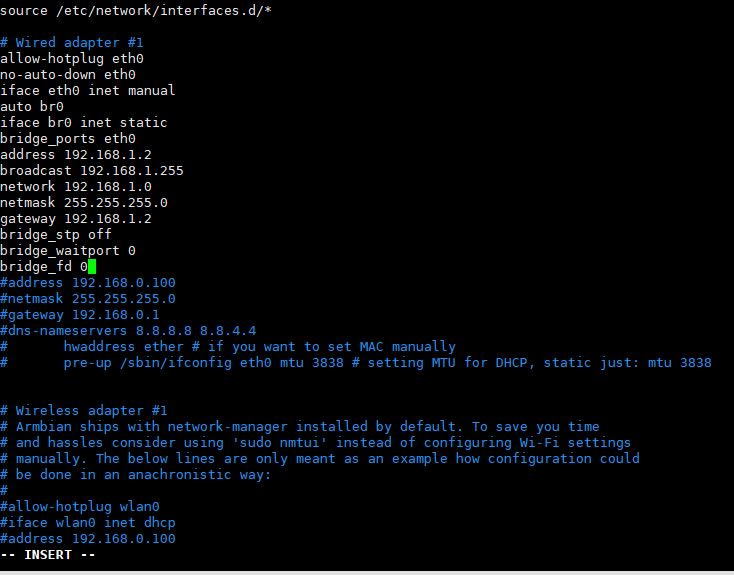
vi /etc/network/interfaces
#iface eth0 inet dhcp 改为iface eth0 inet manual 后面增加以下内容 ###里面的全部 见图一
###
auto br0
iface br0 inet static
bridge_ports eth0
address 192.168.1.2
broadcast 192.168.1.255
network 192.168.1.0
netmask 255.255.255.0
gateway 192.168.1.2
bridge_stp off              
bridge_waitport 0           
bridge_fd 0
###

vi /etc/sysctl.conf
#去掉net.ipv4.ip_forward=1前面的#号

sysctl -p

vi  /etc/rc.local
#在 exit 0 前一行加以下内容
iptables -t nat -A POSTROUTING -j MASQUERADE

reboot

批注 2019-12-29 185147.png

n1接光猫 #n1已经固定IP 192.168.1.2

pppoeconf #进入拨号向导
#第一个选no
#删除username 输入宽带账号
#输入宽带密码
#之后全部 yes

poff -a # 關閉全部pppoe

查看状态
plog
ip addr show ppp0

开机自动拨号
vi /etc/rc.local #在 exit 0 前一行加一句:
pon dsl-provider

账号密码配置文件地址/etc/ppp/pap-secrets

动态域名解析dns

https://github.com/NewFuture/DDNS

git clone https://github.com/NewFuture/DDNS
cd DDNS
./run.py #运行一次 生成config.json配置文件
vi config.json #修改 id 域名 token
./task.sh

说明:朋友账号帮买的小鸡,没有账户,只有root和密码。安装vnstat来统计流量

安装vnStat

apt-get install vnstat #apt安装
vnstat -u -i eth0 #生成流量统计数据库 'eth0'用'ip a'命令查看
systemctl stop vnstat #停止 vnStat 服务
chown vnstat:vnstat /var/lib/vnstat/.eth0 #修改 .eth0 文件的权限
systemctl start vnstat #启动 vnStat 服务

查看流量信息

vnstat -l #实时流量
vnstat -d #日流量
vnstat -m #月流量

参考:https://sb.sb/blog/debian-install-vnstat/

说明:Debian8宝塔面板安装运行环境php失败,编译安装和极速安装都失败了。

错误日志

checking for cURL in default path... not found
configure: error: Please reinstall the libcurl distribution -
easy.h should be in <curl-dir>/include/curl/
make: *** No targets specified and no makefile found.  Stop.
make: *** No rule to make target 'install'.  Stop.

解决办法

apt-get install curl
apt-get install libcurl4-gnutls-dev

参考:https://www.linuxidc.com/Linux/2018-01/150565.htm

前言:
v2ray通过cloudflare拯救被封的IP,之前一直用的233blog的一键脚本,奈何nfp的ovz换了4次系统都没能成功实现,所以手动搭建了,顺便开个记录贴

域名解析

1.使用cloudflare解析域名,为了方便测试,可以先把云朵点灰、关闭cdn(非必要,如果点灰了最后记得再次点亮云朵图标开启cdn)

安装宝塔面板

1.根据自己的系统使用正确的命令安装:

Centos安装命令
yum install -y wget && wget -O install.sh http://download.bt.cn/install/install.sh && sh install.sh

Debian安装命令
wget -O install.sh http://download.bt.cn/install/install-ubuntu.sh && bash install.sh

2.安装完成后,登录BT面板,安装nginx
3.添加站点
输入自己的网址,ftp、数据库、php都不用
4.申请ssl
点击「设置」——SSL——Let’s Encrypt,成功申请SSL后,保存
5.更改 配置文件
再次点击站点「设置」的「配置文件」选项,在最后一个}前添加如下代码:

    location / {
    proxy_redirect off;
    proxy_pass http://127.0.0.1:25534;#25534是v2ray的端口号,注意和之后安装的一致
    proxy_http_version 1.1;
    proxy_set_header Upgrade $http_upgrade;
    proxy_set_header Connection "upgrade";
    proxy_set_header Host $http_host;
    }

6.重启Nignx

安装v2ray

1.安装命令
bash <(curl -L -s https://install.direct/go.sh)
2.修改v2ray配置文件,路径/etc/v2ray/config.json,修改后记得重启v2ray
参考配置:

{
    "log": {
        "access": "/var/log/v2ray/access.log",
        "error": "/var/log/v2ray/error.log",
        "loglevel": "warning"
    },
    "inbound": {
        "port": 25534,#自己的端口号需要对应
        "protocol": "vmess",
        "settings": {
            "udp": true,
            "clients": [
                {
                    "id": "e5cee2d4-d28b-4b8a-83ef-cf788bf1****",#自己的id
                    "level": 1,
                    "alterId": 233
                }
            ]
        },
        "streamSettings": {
            "network": "ws"
        }
    },
    "outbound": {
        "protocol": "freedom",
        "settings": {}
    },
    "outboundDetour": [
        {
            "protocol": "blackhole",
            "settings": {},
            "tag": "blocked"
        }
    ],
    "routing": {
        "strategy": "rules",
        "settings": {
            "rules": [
                {
                    "type": "field",
                    "ip": [
                        "0.0.0.0/8",
                        "10.0.0.0/8",
                        "100.64.0.0/10",
                        "127.0.0.0/8",
                        "169.254.0.0/16",
                        "172.16.0.0/12",
                        "192.0.0.0/24",
                        "192.0.2.0/24",
                        "192.168.0.0/16",
                        "198.18.0.0/15",
                        "198.51.100.0/24",
                        "203.0.113.0/24",
                        "::1/128",
                        "fc00::/7",
                        "fe80::/10"
                    ],
                    "outboundTag": "blocked"
                }
            ]
        }
    }
}

3.V2Ray可使用的命令:

sudo service v2ray start #启动V2Ray
sudo service v2ray stop #停止运行V2Ray
sudo service v2ray restart #重启V2Ray
sudo service v2ray status #查看V2Ray状态